






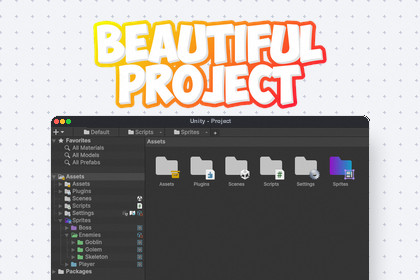
Beautiful Project enhances Unity's Project window with custom colored folders, smooth gradients, automatic sub-icons, and tree lines to keep your assets meticulously organized and visually striking.Beautiful Project is a premium editor extension that gives your Unity Project window a massive visual overhaul. It allows you to customize your workflow by applying vibrant solid colors or seamless multi-directional gradients to any folder. You can automatically assign specific icons to folders based on their name, or manually overlay custom sub-icons perfectly in any corner (or the center) of the folder. With the addition of razor-sharp project tree lines, parent-child folder structures are instantly readable. Designed for maximum performance, it integrates flawlessly into your daily editor workflow without any runtime overhead.Type: Unity Editor extension (no runtime dependency for gameplay)Core hook: Draws via project window GUI callback for each folder and itemStyling model: Per-folder settings with solid color, horizontal, vertical, and diagonal gradient optionsData model: FolderSettings object caching custom icons, sub-icons, positioning, and gradient vectorsUI: Popup folder settings panel with dynamic pastel preset generationAutomation: Predefined dictionary to automatically assign icons based on folder namesRendering extras: Pixel-perfect gradient overlapping, precise tree line connectors, custom sub-icon anchorsPerformance: Global dictionary caching and highly optimized GUI draw callsManagement: Fully integrated into the Beautiful Unity Hub for global settings and silent feedback submissionAI was used as a writing and structuring assistant to draft documentation text, organize sections, and improve clarity and consistency. Technical facts were based on the actual implemented scripts and feature behavior. Final content was reviewed and validated by the developer for accuracy, scope, and wording before use.

