






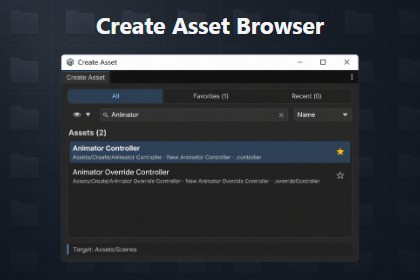
Searchable Create Asset browser for Unity Editor—find ScriptableObject and Create-menu types fast, then create them into the selected Project folder.Stop digging through nested Assets › Create menus.Create Asset Browser is a searchable editor window that gathers creatable asset types into one place—ScriptableObjects (`CreateAssetMenu` / `CreateAssetBrowserMenu`) and Unity Create menu items—so you can find what you need and create it into the folder you already selected in the Project window.# Features- Unified catalog — ScriptableObjects and Unity Create menu entries in one list (Material, C# Script, Scene, Assembly Definition, and more)- Search & sort — Filter by name; sort by Name or menu Order- All / Favorites / Recent — Pin frequent types; return to what you just created# Your ScriptableObjectUse Unity’s `CreateAssetMenu`, or`CreateAssetBrowserMenu` when a ScriptableObject should appear only in this browser (not in the default Create menu). See the package README for attribute details.Architecture, guidelines, and feature design were done by me. Implementation code and documentation drafts were written with AI assistance. Core features were verified in the Editor, and generated code was adjusted as needed.

