






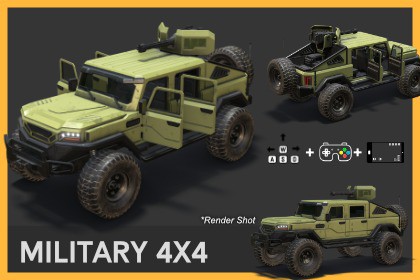
Combat Military Vehicle - Drivable 4x4 Pickup Truck
Jermesa Studio
$15.40
$30.80
50%OFF
(no ratings)
Jump AssetStore
• 3D Model
• Mounted Turret
• Integrated with JRS Vehicle Physics Controller v1.5
• vehicle light system and Sound
• Ready to drive with vehicle physics
• Door animation functionA game-ready, high-detail military combat pickup truck 3D Model setup designed for action, tactical shooter, and open-world titles. Includes Mounted Turret with ready rotatable weapon mount setup, animated interactivity, multiple camera modes, full lighting controls, and cross-platform input support out of the box.Specifications:Model Type: Rigged VehicleInput Support: Unity New Input System (Keyboard, Gamepad, Touch UI)Render Pipelines: Built-in, URPInteractable Parts: 4 Doors, Roof Turret MountLighting: Headlights, Hazards, Brake LightsSupport New Unity Input System (Unity 6 Compatible)With the New Unity Input System, you can bind keys to any compatible controller device, such as your gamepad, joystick, keyboard, or mobile touch input, and more.*Note: If you face any error regarding 'InputAction' or 'InputSystem' in Unity 2022.3 or later please install Input System from your Package Manager under Unity Registry.Download Demo Build for Playing (Windows): combat_pt_built-in_rp_win_demoURP Compatible:This asset is compatible with Universal Render Pipeline (URP).Built natively for Built-in Render Pipeline. Includes a one-click URP converter package inside. You can also watch this tutorial here on how to install our URP setup for your projects.Ready To Drive!These vehicle pack comes with the JRS Vehicle Physics Controller 1.5. You can drive the vehicle, adjust parameters like Motor Force, Max Steer Angle, Brake Force, Gear Ratios, and Shift Threshold. Set up a customizable light system, add door animations and dust particle effects.The script offers customization options for creating dynamic vehicle physics and effects in games or simulations.More Options to Customize Your VehicleOur vehicle scripts comes with different options to customize the behavior of your vehicle. These include:Motor Force: This is the force that your vehicle's engine will produce. Larger numbers mean a more powerful engine.Max Steer Angle: This variable determines how sharply your vehicle can turn. High values will allow for sharp turns, low values for gradual ones.Brake Force: This determines how powerful your brakes are. You can play around with the value.Gear Ratios: These are the ratios that determine how much torque is transferred to your wheels at each gear. Gear ratios control the power and speed of the car. Gear ratios determine the relationship between the engine RPM and the wheel speed. You can add how many gears you want and adjust these values to control the vehicle's acceleration and top speed in each gear.Shift Threshold: The RPM value at which the car will shift to the next gear. When the current RPM exceeds this threshold, the script will automatically shift to the next gear.Enable 4x4: When enabled, this feature activates the vehicle's 4-wheel drive. When disabled, it reverts to 2-wheel drive.Dust Particle System: Reference to the dust particles system for each wheel. They are used to enable or disable the particle systems based on wheel slip, drift, and braking.Keyboard, Game pad, Joystick and Mobile touch Input ControllerEnables vehicle control using both keyboard, Game pad, Joystick and on-screen mobile inputsProvides customizable input buttons with New Unity Input SystemCreate on-screen buttons for mobile inputEasily assign input buttons via Vehicle Input ActionSupports camera switchingSample scene included for keyboard/Gamepad and Mobile touch inputs as shown in this video[Core Handling]- Accelerate / Reverse: W / S- Steering Left / Right: A / D- Brake: Spacebar[Electrical Systems]- Toggle Headlight: H- Toggle Hazard Signal: T[Turret & Vehicle Interaction]- Turret Control: Left-Click directly on turret to select- Select Vehicle: Left-Click directly on nearby scene vehicle[Camera System]- Cycle Camera Layout: C (1. Follow, 2. Orbit, 3. Dash, 4. Orbit V2, 5. Turret)- Orbit Camera Rotation: Left-Click + Drag mouse- Distance Adjust: Scroll Middle Mouse Wheel (Zoom In / Out)[Structural Animation & Interactions]- Open Front Doors: KEYPAD 4 (Left) / KEYPAD 5 (Right)- Open Rear Doors: KEYPAD 1 (Left) / KEYPAD 2 (Right)[Application Operations]- Menu Visibility: F1 (Hide / Show Menu)- Exit Simulation: EscCamera ControllerFive types of cameras included. The Follow camera, the Orbit camera, the Dash-view camera, the Orbit V2 Camera and the Turret view camera.Provide different camera perspectives for the vehicleOffer customizable parameters for camera movement and zoomingCamera Manager: Assign and manage multiple cameras.Adjust parameters like Offset, Rotation Speed, Zoom Speed, and Zoom Time, etcVehicle Door MechanicAllows opening and closing of vehicle doorsProvides customizable parameters for door movement and sound effectsAdjust Angle, Speed, and Assign Key via InputAction using Door id.Audio Sources for open and close soundsVehicle Colour CustomizationThe vehicle car-paint color can be customized according to your need.The body paint uses a separate material from other components, allowing you to change the color without affecting the chassis, wheels etc.We provide a white albedo texture as a base.You can change the colour of the vehicle from the inspector as per your needs.Functional Light SystemA fully functional light system that can be activated for the headlight, brake light, signal light, reverse light, and extra light. These lights can be controlled and customized to suit different gameplay situations, enhancing the vehicle's functionality and versatility in the game environment.The Light control script was design in such a way that each light elements an be easily dragged and dropped into its corresponding function, ensuring a seamless user experience.You can also add your own lights elements by clicking on the ‘+’ icon below each light element properties.Prefab includedAdding these vehicles to your scene is as easy as drag-and-drop with the included prefab.Light Glow EffectIf light glow effect is not enable in your scene then you need to install Post Processing if you are using the Built-in Render Pipeline.If you are using URP then no need to install Post Processing since this features is already included in URP.Package Contains: 3D Vehicle Model + Desert environment propsPBR Texture: Each model includes both exterior body paint and interior designs with Physically Based Rendering (PBR) textures that enhance the vehicle's look under different lighting conditions.Poly Count (Vehicle): 40,508 tris•Interior : 3106 tris•Exterior : 21,922 tris•4 Wheel + 1 Spare Wheel : 15,480 trisAudio files:Asset uses audio files from Sonniss #GameAudioGDC Bundle under a Royalty-Free Commercial License; see Third-Party Notices.txt file in package for details.Support Team:Every asset in this pack has been skillfully designed and modeled from scratch by our dedicated team of professional artists. If you need any help regarding or assets please reach out to us from our contact details below.Video Demo: https://youtu.be/HRvu2nDUby4Tutorial:How to set up a URP Project in Unity with Our Asset PackContact:Send EmailWhatsAppwww.jermesa.comJoin US on DiscordPoly Count (Vehicle): 40,508 tris•Interior : 3106 tris•Exterior : 21,922 tris•4 Wheel + 1 Spare Wheel : 15,480 trisTexture Dimension:4096x4096 (vehicle body / decals )2048x2048 (glass / wheel / interior / desert stone / sand )2048x2048 (Interior display)64x64 (dust)Texture Format: PNGPBR texture: YesRigging: YesUV mapping: YesVehicle Controller Script: YesCamera Script: YesPolice Siren Script: YesLight Controler Script: YesAI was used as an assistance for text generating purpose like code, titles, descriprions, infos, ideas, documenting etc.

