






Animation Hover Preview - Preview With Your Mouse
Harpia Games Studio
$10.95
$21.89
50%OFF
(no ratings)
Jump AssetStore
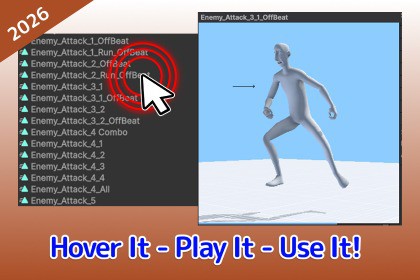
Easy hover preview for AnimationClips. Move your Mouse over any clip in the Project window or Inspector and watch it play instantly.Works with the Built-in Render Pipeline and URP (Universal Render Pipeline). The preview auto-detects your active pipeline and swaps in compatible shaders, replacing any incompatible/error materials with a neutral default so previews never render pink. HDRP is not officially supported — clips will still preview, but some helper visuals (floor grid, fallback materials) may not render correctly.Animation Hover Preview lets you instantly preview any AnimationClip just by moving your Mouse over it — no clicks, no extra windows.If your Inspector is crowded with AnimationClip fields, or your Project holds dozens of clips, this tool was built for your workflow.Stop wasting time clicking an AnimationClip field, waiting for it to open, then going back to the Inspector. Just hover it with your mouse.Features:Mouse-hover preview in the Project window and Inspector (UI Toolkit & IMGUI) — works on any InspectorInteractive viewport (optional): orbit, pan, zoom, and double-click to reset; view angle is remembered across previewsAuto model resolution for generic, embedded, and humanoid clipsClip metadata overlay (optional): — length, FPS, frame count, loop flag, and root-motion flagThree window sizes (Small / Medium / Large), multi-monitor awareFully customizable — visual style, window size and position, playback speed, hover delay, humanoid model, and more; every setting persists per project between sessionsWorks with Unity 2021.3 LTS and upWorks with Windows and MacOS, Linux was not testedOther AssetsPrefab Brush - Easy Level Design ToolPerfectShot - Image Creation & MarketingMouse-hover preview in Project window and InspectorUI Toolkit & IMGUI supportInteractive viewport — orbit, pan, zoom, resetAuto model resolution (generic, embedded, humanoid)Box-skeleton fallbackRoot-motion compensationScrolling floor gridClip metadata overlayTwo visual styles (Unity Style / Fancy)Small / Medium / Large window sizesFollow-cursor or 6 fixed anchor positionsMulti-monitor awareHover delay timerPlayback speed multiplierRender FPS cap (20–120)Camera Look At Bounds CenterShow/hide clip metadata overlayHide preview on selection changeDefault humanoid model assignmentSkip root bones (box-skeleton)Skip IK bones (box-skeleton)Preview in Project tab togglePreview in Inspector tab toggleMaster on/off togglePer-project settings via Project Settings ▸ Harpia ▸ Animation Hover PreviewAI assisted with generating code comments and unit tests, and with drafting marketing and documentation copy.

