






Tween In Inspector - Animate UI in few clicks
AnkleBreaker
$23.09
$32.99
30%OFF
(no ratings)
Jump AssetStore
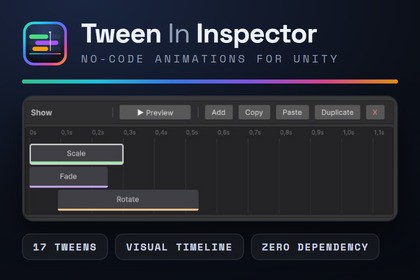
Inspector-driven tween animation system — 17 tween types, visual timeline editor, backend-agnostic, 14 presets includedNot required but compatible : DoTween OR PrimeTween💬 Join the AnkleBreaker Community! 💬Got a question, feedback, or a feature you'd love to see? Join our Discord, we actively improve our assets based on your input, it's where we drop our latest announcements and run giveaways.👥 Discord: 👉 https://discord.gg/2D36VUmsYN🌐 Website: 👉https://anklebreaker-consulting.com/fr🎬 Build Production-Ready Animations Without Writing a Single Line of CodeStop fighting with tween code. Stop copy-pasting the same DOMove → DOScale → OnComplete boilerplate across 50 prefabs.Configure, chain, and preview complex UI and GameObject animations directly from the Inspector — and ship them in minutes.⚙️ No Tween Library Required ⚙️Tween In Inspector ships with its own built-in tween engine but you can also use DOTween and PrimeTween (both are free and compatible).🧩 Core Components 🧩TweenPlayer — the main animation controller with a visual Tween Animation Timeline.EnhancedButton — UI Button with built-in tween bindings for Click, Hover, Unhover, and Interactable/NotInteractable states. Includes an optional grayscale shader for disabled state.ToggleableObjectWithTweens — automatic show/hide with tween animations and completion callbacks.Live Edit Mode preview — test, scrub, and tweak animations without entering Play Mode.🚀 Why Tween In Inspector? 🚀17 Tween Types, Move, Scale, Rotate, AnchorPos, SizeDelta, Fade, Color, FillAmount, PunchScale, Shake, JumpAnchorPos, PunchAnchorPos, TextReveal (typewriter), TextCounter (animated numbers), Event, ToggleObject, and PlayTweenAnimation (nested animations).Backend-Agnostic, Switch between our custom API or DOTween and PrimeTween with one click. Your animation data is preserved. Pick the backend that fits your project, change your mind later.Visual Timeline Editor, Custom UI Toolkit inspector with timeline visualization, ease curve preview, live Edit Mode playback, and full copy/paste support.14 Pre-Built Animation Presets, Production-ready ScriptableObject animations: BounceIn, ElasticPop, PanelPopIn/Out, PunchFeedback, ShakeAlert, TitleDrop, SubtitleReveal, and more. Drag, drop, done.Named Animation System, 13 built-in animation IDs (Show, Hide, Idle, Highlight, Click, Hover, Unhover, Success, Error, Warning...) + unlimited custom IDs. Call Play("Show") from code, or wire everything in the Inspector.Advanced Blending & Control, Override mode kills running tweens, Additive stacks them. Fine-tune self-override, kill behavior (complete-to-end vs. cancel-at-current), loop modes (Restart, PingPong, infinite), and unscaled time for pause menus.Reusable Animation Assets, Save any animation as a TweenAnimationAsset ScriptableObject. Share across scenes, prefabs, and projects. Override targets per-instance for maximum flexibility.Interactive demo scene showcasing every tween type and patternIn Editor Documentation Window and an illustrated PDF documentationDiscover more quality & productivity tools for Minimaps, Cinematic Cameras, Manager Initialization, Radial Menus, and more.- Unity Version: 2022.3 LTS and newer (including Unity 6)- Render Pipelines: Any — Built-in, URP, HDRP- Tween Backends: DOTween (Free/Pro), PrimeTween (Free), or Built-in engine (bundled with the package) — switchable at any time- Scripting Backend: Mono / IL2CPP- Platforms: All platforms supported by Unity- Dependencies: Fetched from GitHub: AnkleBreaker Core, AnkleBreaker Utils Inspector, AnkleBreaker Utils UIBasics. A Dependencies Installer window appears on import to install them in one click.- Namespace: AnkleBreaker.TweenInInspector- Assembly Definitions: 5 asmdef — Runtime, Editor, Editor.Installer, Examples, Tests- Tween Types: 17 — Move, Scale, Rotate, AnchorPos, SizeDelta, Fade, Color, FillAmount, PunchScale, PunchAnchorPos, Shake, JumpAnchorPos, TextReveal, TextCounter, Event, ToggleObject, PlayTweenAnimation- Ease Functions: 32 — Linear + 10 ease families × 3 variants each + Flash- Animation Presets: 14 pre-built ScriptableObject assets- Custom Shader: 1 — UI Grayscale with stencil support- Runtime Scripts: 35 C# files- Editor Scripts: 22 C# files- Sample Scenes: 1 interactive showcase (TweenShowcase)- Sample Scripts: 6 example controllers- Unit Tests: 28- Source Code: Full C# source included- Documentation: Documentation Window + Illustrated PDF

