






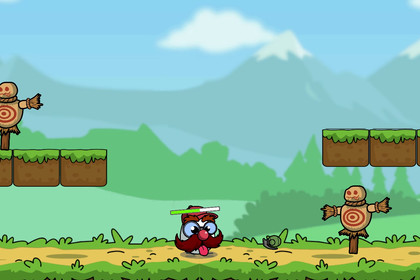
Free Unity editor tool for modular egg-style 2D characters. Generate a prefab from included parts and weapons, then drop it into your scene. Includes three playable characters and a platformer sample.The sample uses URP 2D materials and requires a 2D Renderer. Optional tools convert stock EggHeads materials to Built-in, URP 2D, or HDRP, with backup and restore. HDRP sprites are unlit and do not respond to lighting. Custom materials and scene setups may need manual adjustments. Check sprites, effects, and UI after switching pipelines.EggHeads Lite is a free Unity package for creating modular egg-style characters directly in the editor. Choose visual parts, customize supported colors, and generate character prefabs without writing code.Start with three ready-to-play characters—RangedMan, PunkMan, and BomberMan—or build your own combinations using searchable part galleries and a live preview. The included platformer sample lets you try movement, combat, weapon pickups, and audio.WHAT’S INCLUDED• Editor character generator with searchable part galleries, live preview, presets, and Undo/Redo• Generate prefabs or use Generate & Add to Scene• First-import Setup window with shortcuts to tools, the demo, and documentation• Three ready-to-play characters with animations• Modular bodies, eyes, noses, mouths, eyebrows, hair, hats, and facial hair• Ranged, melee, and throwable weapons, with one prefab per category• Object pooling for projectiles and explosion effects• Event-driven audio with a pre-configured AudioLibrary• Ready-to-play platformer sample scene• Optional Built-in, URP 2D, and HDRP conversion tools with backup and restore• Organized hierarchy containers for spawned VFX and audio• Character database inspector with a Validate Database toolHOW IT WORKSImport the package and open the Generator from the Setup window.Choose a preset or browse the included parts.Customize supported colors or select None to clear a slot.Click Generate or Generate & Add to Scene to create your character prefab.Try your character in the platformer sample or add it to your own configured scene.The sample ships with URP 2D materials. Optional conversion tools adapt stock EggHeads materials for Built-in, URP 2D, or HDRP, with backup and restore for affected assets and settings. HDRP uses unlit sprite rendering.REQUIREMENTS• Unity 2022.3 LTS or Unity 6• Unity Input System, 2D Animation, 2D Sprite, and Unity-compatible TextMeshPro/UGUI packages• Active Input Handling set to Input System Package (New) or Both• Custom scenes require Ground and Throwable layers, plus AudioManager and ProjectilePool for the sample’s audio and pooling setupThe included sample already contains the required scene components. See the package documentation for dependency versions, controls, and setup instructions.LITE AND FULLEggHeads Lite is free and focuses on editor-based character creation with a starter collection of parts and weapons.EggHeads Full expands the character and part collection and adds a runtime character creator with a color wheel and appearance save/load.The updated Lite release supports upgrading to a compatible Full package in the same project. Older Lite projects require preparation before importing Full. Follow the Upgrade to Full guide included in the documentation.• Targeted editor and render pipeline checks performed in Unity 6.6.4 (6000.6.4f1)• Sample materials use URP 2D. Optional conversion tools are available under Tools > PyroDuck > EggHeads > Render Pipeline• HDRP conversion uses unlit sprite rendering• Dependencies: Input System 1.19.0, 2D Animation 9.2+, 2D Sprite, and Unity-compatible TextMeshPro/UGUI packages• Set Active Input Handling to Input System Package (New) or Both• Runtime namespace and assembly: com.pyroduck.eggheads.Runtime• Editor assembly: com.pyroduck.eggheads.Editor• ScriptableObject data: VisualDataSO, VisualGroupsDataSO, AudioLibrarySO, and EggHeadDatabaseSO• Object pooling for projectiles, throwable projectiles, and explosion effects. Ranged projectiles fall back to Instantiate when ProjectilePool is unavailable• Type-safe event system with subscription cleanup when the runtime reinitializes, including when domain reload is disabled• SceneOrganizer groups spawned VFX and audio under named hierarchy roots• Database validation checks null entries, duplicates, and missing iconsAI assistance (Claude by Anthropic, via Cursor IDE and ChatGPT 5.5 via Codex IDE ) was used during the development and polish phase of this package. Specifically, AI helped with:- Code review: identifying dead code, unused APIs, duplicate logic, and inconsistent namespaces across 51 scripts- Refactoring: extracting shared audio helper (ProjectileImpactAudio), cleaning up Events.cs, normalising using directives- Bug fixes: shotgun pellet count off-by-one, Projectile contact index guard, ShadowGroundSnapper null safety- Asset setup: structuring AudioLibrary.asset YAML and wiring AudioManager in the sample scene- Documentation: README (Scene Setup, Audio Setup, Lite vs Full table), CHANGELOG, and Asset Store listing copy- Tooling: batch audio normalisation script (ffmpeg) to meet the -0.3 dB peak requirement, line ending normalisationAudio clips included in this package were generated using AI audio tools. All generated clips were reviewed and selected by the human developer based on quality and fit for the package.All generated or suggested code and assets were reviewed, tested, and approved by the human developer before inclusion. Core gameplay systems, visual assets, animations, and prefabs were created by the developer independently of AI tooling.

