






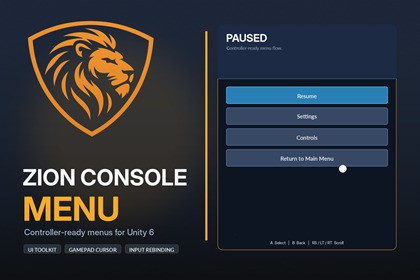
Controller-ready UI Toolkit menu system including main and pause menus, settings, credits, input rebinding, virtual cursor, game-flow hooks, setup wizard and diagnostics.Zion Console MenuStop rebuilding the same menu systems every time you start a new Unity project.Zion Console Menu gives you a complete, controller-ready menu foundation built with UI Toolkit and the New Input System. It covers the menus players expect, the settings developers usually have to wire by hand, and the setup tools needed to get everything working without hours of scene configuration.It is designed for Unity 6.0 to 6.5 and works with keyboard, mouse and gamepad from the start.A complete menu foundationThe package includes a polished main menu, pause menu, settings screen, credits screen and controls screen. Navigation history is handled for you, so opening Settings from Pause returns to Pause, while opening it from the Main Menu returns to the Main Menu.New Game, Continue, Resume and Return to Main Menu are connected through a flexible Game Flow Bridge. You can use the built-in scene-loading options or connect the menu to your own game systems through UnityEvents.Built for gamepad useZion Console Menu is more than a keyboard-first menu with controller navigation added afterward.It includes:• A virtual gamepad cursor controlled by the left stick• Automatic keyboard, mouse and gamepad prompts• D-pad navigation and Submit/Cancel support• Right-stick and trigger scrolling for longer screens• Correct UI layering so the cursor always remains visibleThe input prompts update automatically when the player changes input method.Audio, display and control settingsThe Settings screen includes practical options players expect:• Master, music and SFX volume with AudioMixer support• Fullscreen mode, resolution and VSync• Saved preferences through PlayerPrefs• Runtime input rebinding for keyboard and gamepad• Individual binding reset, Reset All and duplicate-binding checksBinding overrides are saved automatically and restored the next time the game starts.Setup without the usual guessworkThe included Zion-branded Setup Wizard can generate the required scene objects, register menu screens, assign Panel Settings, create supporting services and wire common callbacks.Built-in diagnostics check for problems such as:• Missing or duplicate screen IDs• Incorrect UIDocument sort orders• Input Action Asset mismatches• Missing Navigate, Submit, Cancel or Pause actions• AudioMixer and exposed-parameter issuesA copyable diagnostic report also makes support and troubleshooting much easier.Ready for real projectsZion Console Menu does not force you to use a particular scene manager or save system.The Game Flow Bridge supports event-only workflows, built-in asynchronous scene loading and loading-screen progress hooks. The Continue button also has a public availability API, allowing a save system to enable or disable it depending on whether valid save data exists.This makes the package useful as a standalone menu solution today while leaving clear integration points for larger projects.Included• Complete demo scene• Setup Wizard and diagnostics• Main, pause, settings, credits and controls screens• Gamepad cursor and automatic input prompts• Audio, display and rebinding systems• Game Flow and loading-screen hooks• Quick-start guide, user documentation and integration notesRequirementsWorks on Unity 6.0 to Unity 6.5New Input System onlyUI Toolkit runtime UIZion Console Menu is intended for developers who want a professional menu foundation without committing to a large gameplay framework or spending days rebuilding common UI systems.Demo audio includes selected CC0 assets from Kenney UI Audio. Full licensing information is included in the package’s Third-Party Notices file.🌐 Online docs: Zion Console Menu - ZionGames Docs💬 Support: Discord: Here🦁 More tools: https://ziongames.co.ukUnity version: Works on Unity 6.0 to Unity 6.5Input: New Input System onlyUI framework: Runtime UI ToolkitIncludes main menu, pause menu, settings, credits and controls screens. Supports keyboard, mouse and gamepad, with a left-stick virtual cursor, D-pad navigation, automatic input prompts and right-stick or trigger scrolling.Audio settings support Master, Music and SFX groups through Unity’s AudioMixer. Display settings include window mode, resolution and VSync. Preferences and input-binding overrides are stored using PlayerPrefs.Runtime rebinding supports keyboard and gamepad bindings, duplicate detection, individual reset and Reset All.The Game Flow Bridge supports UnityEvents or asynchronous scene loading for New Game, Continue, Resume and Return to Main Menu. Loading-screen progress hooks and a public Continue-availability API are included for integration with save systems and custom scene managers.The editor package includes a branded Setup Wizard and diagnostics window for generating missing objects, registering screens and checking common setup problems.Dependencies:Unity Input System packageNo third-party runtime framework requiredRender pipeline: The runtime menu system is render-pipeline independent.Important: The package provides controller-driven menus but does not include console SDK integrations or platform certification features.Selected Kenney UI Audio clips are included under the CC0 licence. Full attribution and licence details are provided in the Third-Party Notices file.Marketing images were generated and enhanced using AI tools and Python scripts.

