




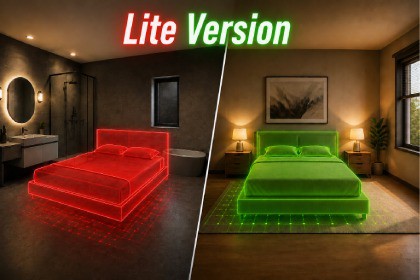
This Placement System is a placement solution featuring real-time preview, visual placement validation, and multi-layer object-to-surface matching for creating structured and interactive environments.Quick Object Placement System Lite provides a streamlined and easy-to-use object placement solution for structured environment building and interactive scene creation.The package allows users to select objects and place them directly into the scene using a real-time placement preview system. Before placement, a preview object follows the cursor or touch position, providing instant visual feedback for accurate positioning. The preview changes color to indicate whether the current location is valid or invalid for placement, helping users build environments with confidence.A powerful multi-layer placement validation system is included, allowing each placeable object to be assigned to specific target layers. This ensures that objects can only be placed on their designated surfaces. For example, furniture can be restricted to furniture layers, sanitary objects to sanitary layers, or decorative items to custom-defined layers. This layer-matching system helps maintain logical placement rules and prevents incorrect object positioning.The package includes a clean and customizable placement workflow that is easy to integrate into existing projects. Developers can quickly add new placeable objects, configure placement rules, and customize visual feedback to match their project's requirements.Designed with a modular architecture, the system is optimized for both PC and mobile platforms, making it suitable for simulation games, house-building systems, interior design applications, and interactive environment creators.Features you Get:placement workflow (Preview → Instantiate)Layer-based placement validation (Valid & Invalid Layers system)Real-time preview with dynamic color feedback (valid/invalid states)Smooth preview movement with camera-follow behaviorAdjustable preview offset and placement settingsRaycast-based surface detection systemPrefab-based setup for easy customizationManager-based architecture for centralized controlClean and modular scripts for easy extensionMobile & PC-both controls and performance supportImportant: The Unity Input System and Cinemachine packages must be installed in your project for the asset to function correctly.Upgrade to ProFor additional functionality, check out the Pro version:Quick Object Placement System Pro - Save & Load System

