




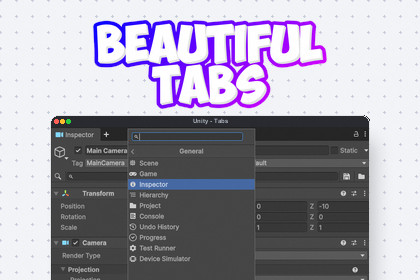
Beautiful Tabs modernizes the Unity Editor window management system. With a beautiful, browser-like tabbing experience, native + button, fluid dragging, and a smart search window categorizer.Beautiful Tabs is a premium editor extension that completely modernizes the Unity Editor's window docking system by introducing a beautiful, browser-like tabbing experience. It elevates your daily workflow by seamlessly integrating a native '+' button directly into Unity's DockArea, allowing you to instantly spawn new windows without navigating messy drop-down menus.Boost your productivity with fluid tab dragging and standard browser keyboard shortcuts (Ctrl + T to open, Ctrl + W to close) for lightning-fast workspace management. When adding a new tab, you are greeted with a visually clean, smart Search Window that intelligently categorizes all available editor tools, from the Inspector to third-party assets, into logical groups. Designed for maximum performance, it integrates flawlessly into the editor's layout system with absolutely zero runtime overhead.Type: Unity Editor extension (no runtime dependency for gameplay)Core hook: Hooks into Unity's internal DockArea GUI to seamlessly inject the native '+' button alongside standard tabsInput model: Global editor event interception to support standard browser-style shortcuts (Ctrl+T, Ctrl+W)UI: Replaces standard window dropdowns with a highly categorized, visually clean Search Window popup for instant tool discoveryData model: Categorization dictionary that logically groups and sorts both built-in Unity windows and third-party toolsRendering extras: Fluid tab dragging, native icon integration, and smart window sorting within the search menuPerformance: Lightweight, optimized GUI execution that integrates cleanly into Unity's layout system without causing expensive redrawsManagement: Fully integrated into the Beautiful Unity Hub for toggling the native button, shortcuts, and global settingsAI was used as a writing and structuring assistant to draft documentation text, organize sections, and improve clarity and consistency. Technical facts were based on the actual implemented scripts and feature behavior. Final content was reviewed and validated by the developer for accuracy, scope, and wording before use.

