






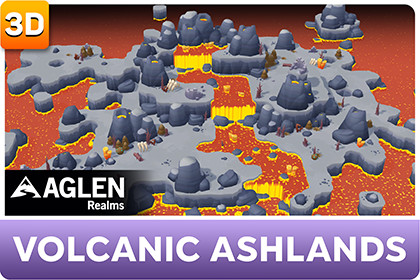
Low-poly Volcanic Ashlands biome for Aglen Realms: volcanic ground, lava liquids, rocks, dry vegetation, and ruins. Requires Aglen Realms - World Core (URP).Aglen Realms - Low Poly Volcanic Ashlands is a content biome for the Aglen Realms series: volcanic ground and lava-style liquids with ashland rocks, dry vegetation, crystals, and ruins — ready to paint and place in World Core.This pack is content only. The painting and placement tools ship with **Aglen Realms - World Core** (required, sold separately).REQUIRES• Aglen Realms - World Core• Unity 2022.3 LTS or newer• Universal Render Pipeline (URP)WHAT YOU GET• Volcanic Ashlands Biome Definition + Environment Library• Ground tile prefabs (9)• Liquid tile prefabs (5)• Environment — Rocks (21)• Environment — Vegetation (13)• Environment — Props (11)• Biome materials and textures• Unique volcanic meshes (rocks, dry plants, crystals, ruins)• Sample scenes: Scene_volcanicashlands, Showcase• Quick Start PDFHOW TO USE1. Install Aglen Realms - World Core first2. Import this biome pack3. Open Window → Aglen Realms → World Core4. Select Volcanic Ashlands in the Biome dropdown5. Paint Landscape tiles and place Environment objects as usualNo manual registration. World Core discovers the biome automatically.NOTES• Prefabs in this pack use the Volcanic Ashlands look; landscape tiles also rely on the shared mesh/shader setup from World Core• Custom content you create is yours; Aglen Realms assets stay under the Asset Store EULASuitable for stylized / low-poly / toon outdoor games that need a volcanic / ashland environment inside the Aglen Realms workflow.Aglen Realms - Low Poly Volcanic Ashlands is a content biome for the Aglen Realms series: volcanic ground and lava-style liquids with ashland rocks, dry vegetation, crystals, and ruins — ready to paint and place in World Core.This pack is content only. The painting and placement tools ship with **Aglen Realms - World Core** (required, sold separately).REQUIRES• Aglen Realms - World Core• Unity 2022.3 LTS or newer• Universal Render Pipeline (URP)WHAT YOU GET• Volcanic Ashlands Biome Definition + Environment Library• Ground tile prefabs (9)• Liquid tile prefabs (5)• Environment — Rocks (21)• Environment — Vegetation (13)• Environment — Props (11)• Biome materials and textures• Unique volcanic meshes (rocks, dry plants, crystals, ruins)• Sample scenes: Scene_volcanicashlands, Showcase• Quick Start PDFHOW TO USE1. Install Aglen Realms - World Core first2. Import this biome pack3. Open Window → Aglen Realms → World Core4. Select Volcanic Ashlands in the Biome dropdown5. Paint Landscape tiles and place Environment objects as usualNo manual registration. World Core discovers the biome automatically.NOTES• Prefabs in this pack use the Volcanic Ashlands look; landscape tiles also rely on the shared mesh/shader setup from World Core• Custom content you create is yours; Aglen Realms assets stay under the Asset Store EULASuitable for stylized / low-poly / toon outdoor games that need a volcanic / ashland environment inside the Aglen Realms workflow.AI (Cursor) assisted with package code and documentation. All 3D content, textures, and art were created by the author without generative AI.

