






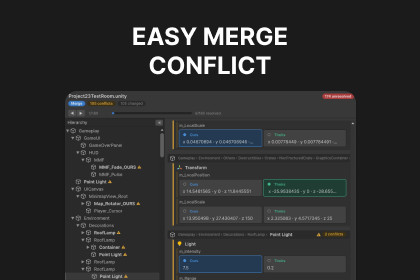
Resolve Unity scene, prefab, and asset merge conflicts visually. See file IDs and GUIDs as real names, keep both sides' work instead of losing it, and stage the result — all with your existing Git.Stop dreading scene merges.When two people edit the same Unity scene or prefab, Git turns the conflict into a wall of fileID: 1001 and guid: a1b2c3…, and Unity's built-in merge silently drops one side's work. Easy Merge Conflict makes scene, prefab, and asset merges safe and readable: it resolves every fileID and GUID to a real GameObject, component, or asset name, shows Ours vs Theirs side by side, and lets you pick a side per object — then writes the merged file and runs git add.Why it's safeInstead of parsing the messy markers in your working copy, it reads the three clean versions from Git — base, ours, theirs — and diffs them structurally: per object, per property, per list element. A change only one side made is applied automatically; a genuine clash asks you to choose. When each side adds a different child, component, material property, or Addressable entry, both are kept — no more silent data loss. Every file is backed up before changes and validated for a clean import, with one-click restore.Key featuresPlain-language conflicts — fileIDs and GUIDs resolved to names; vectors shown as x 5 · y 0 · z 0Keep-both list merging — m_Children, m_Component, materials, Addressable entries, Animator states & transitions, prefab overrides.meta merging — importer settings per field, plus project-wide GUID repointing so nothing becomes a Missing referenceReconstructed Hierarchy — a navigable scene tree built from a conflict-marked file, with + ours / + theirs tagsRebase-aware — detects rebase / cherry-pick / revert and relabels the toggles so you never discard your own commitBroken-reference warnings before the file is writtenResponsive UI Toolkit window with per-file conflict-count badges and noise filtersHow it worksHit a merge conflict in any Unity text-YAML asset or a .meta file.Open Tools ▸ Easy Merge Conflict.Pick Ours or Theirs per conflict (or All → Ours / Theirs), then Apply & Stage.Finish the merge in your Git client.Honest scopeTop level and one level of nesting merge granularly; a deeper combined change is surfaced as a single Ours/Theirs choice — never silently dropped. The tool resolves and stages the asset; you run commit / --continue / --abort yourself. It works best on Unity-emitted YAML.Works with any Git workflow. No external dependencies. Editor-only — nothing ships in your build.Questions or feature requests: hoangvm2307@gmail.comUnity 2022.3 or newer (built and verified on Unity 6)Editor-only — no runtime code; nothing is added to your buildRequires Git on the system PATH (path configurable in Settings)No external dependencies or third-party packagesFull C# source includedSupported assets: .unity, .prefab, .asset, .controller, .anim, .mat, .mixer, .preset, .meta, and other YAML-serialized types (binary-serialized assets are skipped — use Force Text serialization)Works with any Git workflow — merge, rebase, cherry-pick, revertLogic core covered by 147 EditMode testsBackup & one-click restore; result validated for a clean import before stagingUI built on UI Toolkit with a responsive layoutWrite code, write description, summary

