






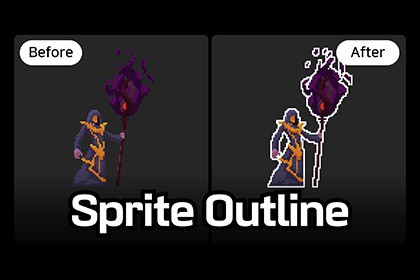
Pixel-perfect sprite outline for 2D & pixel art. One component, zero setup. Customizable color, thickness, and edge detection.Sprite Outline adds a crisp, pixel-perfect outline to any SpriteRenderer using just a single component. Designed specifically for pixel art and 2D sprites, it respects hard pixel edges and delivers clean outlines at any resolution.No material editing. No shader graphs. No post-processing.Just go to Add Component > Effects > Sprite Outline, and it works instantly on any sprite!✨ FeaturesZero Setup: Attach the component, and the outline appears immediately.Pixel-Perfect Edge Detection: Works beautifully with pixel art sprites.Adjustable Thickness: Fine-tune outline thickness from 0 to 16 pixels.Full Color Control: Pick any outline color via the Inspector or runtime API.Alpha Threshold: Adjust which sprite edges get outlined (great for anti-aliased sprites).Sorting Offset: Renders cleanly behind the sprite with zero z-fighting.Animation-Ready: Fully compatible with Unity Animator, sprite swapping, and flipping.Pipeline Agnostic: Seamlessly supports Built-in, URP, and HDRP.Runtime API: Control SetOutlineColor, outlinePixels, and more directly from your code.⚙️ How it worksThe component creates a lightweight overlay mesh behind your sprite and uses an edge-detection shader that samples 8 neighboring pixels. Only the edges are colored—the original sprite remains completely untouched. The result is a clean outline that flawlessly follows your sprite through animations, scaling, rotation, and flipping.🚀 PerformanceHighly Optimized: Only 1 extra draw call per outlined sprite.Lightweight: Just 4 vertices per outline mesh.No Overhead: Zero render textures, command buffers, or post-processing passes required.🎨 Customization (Inspector Properties)Outline Color: Choose any color.Outline Pixels: Set thickness (0 to 16).Alpha Threshold: Define which alpha values count as an edge (0.0 to 1.0).Sorting Order Offset: Adjust the render position relative to the base sprite.🎯 Suitable forPixel Art Games: Platformers, RPGs, and action games.Highlighting Elements: Interactable objects, enemies, items, or selected units.Visual Feedback: Hover effects, selection outlines, and targeting indicators.Any 2D Project: A versatile effect that works with any sprite texture.📦 What's includedSpriteOutlineRenderer.cs (Main component)SpriteOutlineOnly.shader (Edge-detection shader)Interactive demo scene with UI controlsDemo character sprites (CC-0 licensed)Comprehensive documentation (PDF, HTML, and Markdown)📌 RequirementsUnity 2022.3 or laterCompatible with Built-in, URP, and HDRPNo additional packages required!Pixel-perfect edge-detection shader samples 8 neighbor pixelsAdjustable outline thickness: 0 to 16 pixelsConfigurable outline color with runtime SetOutlineColor APIAlpha threshold slider for precise edge detection (0 to 1)Sorting order offset for clean rendering behind the spriteAutomatic mesh generation from any sprite textureReal-time updates in LateUpdate for animation and sprite swap supportWorks with SpriteRenderer flipping (flipX / flipY)Fully compatible with Sprite AtlasSupports all render pipelines: Built-in, URP, HDRPAddComponentMenu shortcut: Effects / Sprite OutlineSingle draw call overhead per outlined spriteNo external dependencies or additional packages requiredIncludes full demo scene with interactive controlsDocumentation provided in PDF, HTML, and Markdown formats

