






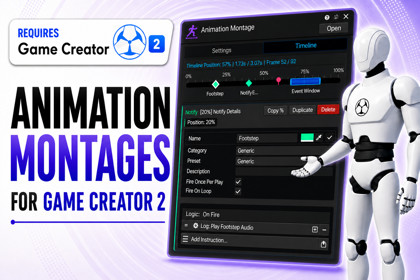
Animation Montages for Game Creator 2
Skyward Games
$19.24
$27.49
30%OFF
(no ratings)
Jump AssetStore
Visual animation montage timeline for Game Creator 2 that lets designers sync gameplay events, windows, branches, and transform tracks to animation playback.Animation Montages for Game Creator 2Build powerful animation-driven gameplay moments directly inside Game Creator 2. 🎬⚡Animation Montages for Game Creator 2 is a designer-friendly animation sequencing tool for Unity that gives you a visual timeline workflow for creating attacks, combo chains, hit windows, interaction animations, cinematic beats, special moves, and character-specific action sequences — without touching Game Creator 2 core files.Create a Montage asset, assign a Gesture clip or Game Creator State, and place gameplay logic along a clean 0–100% normalized animation timeline. Your timing stays consistent even if the animation speed changes or you swap clips later.Use Montages to control exactly what happens during an animation:✨ Notifies trigger logic at precise moments🟪 Windows define active timing ranges, such as hitboxes, parry windows, or cancel windows🎞️ Sections organize your animation into named playback parts🔀 Branches handle conditional transitions and combo flow📍 Transform Tracks apply timed position, rotation, or offset changes⚙️ Parameters let you drive montage behavior at runtimeEverything integrates directly with Game Creator 2 Visual Scripting through actions, conditions, and triggers. Designers can play montages, wait for notifies, check active windows, jump between sections, branch based on gameplay conditions, set runtime parameters, and control playback — all from familiar Game Creator workflows.The package also includes a polished custom UI Toolkit inspector built for fast iteration. Drag markers, resize windows, search and filter timeline items, preview animation timing, diagnose setup issues, and debug active montages during Play Mode with a clean, focused editor experience.Perfect for:🎮 Melee attacks and combo systems🗡️ Hit windows, dodge windows, parry windows, and cancel windows🚪 Interaction animations with synced gameplay logic🎥 Cinematic character moments🧍 Character-specific action sequences⚔️ Combat abilities, special moves, and animation-based skillsSupport & ResourcesNeed help setting things up or want to learn more? You can find support, documentation, and updates here:💬 Discord Support Server🌐 Website📘 Online DocumentationAnimation Montages brings timeline-based animation logic to Game Creator 2 — making complex animated gameplay easier to build, easier to debug, and easier to control.Technical DetailsHere’s a clear overview of what’s included with Animation Montages for Game Creator 2:⚙️ Core SystemUnity Editor Extension built specifically for Game Creator 2Visual timeline authoring using normalized 0–100% animation timingSupports both Gesture clips and State-based playback sourcesNon-invasive architecture that does not modify Game Creator 2 core filesPackage is isolated under:Assets/Plugins/SkywardGames/AnimationMontages/🎬 Timeline AuthoringPerfect for footsteps, VFX, sound effects, weapon trails, combo prompts, and custom logic.Point Notifies for exact animation-timed eventsUseful for hitboxes, parry timing, cancel windows, input buffers, movement locks, invulnerability frames, and more.Range Windows for active gameplay timingOrganize animations into reusable parts with support for jumps, loops, queued flow, and structured playback.Sections for named playback segmentsCreate smarter animation flows based on gameplay state, inputs, parameters, or custom conditions.Branch Points for conditional montage logicApply position, rotation, and scale adjustments during montage playback.Transform Tracks for timed offsets🔌 Game Creator 2 IntegrationIncludes Game Creator 2 Visual Scripting support through:ActionsConditionsTriggersControl montages directly from your Game Creator workflows:PlayStopCancelPauseResumeQueue sectionsJump between sectionsSet parametersCheck active windowsReact to notifies🧰 Editor ToolsCustom UI Toolkit inspectorSetup diagnostics to catch missing or invalid configurationTimeline search and filtersDrag-and-drop marker editingRange resizingPreview controlsPlay Mode diagnostics for easier debuggingFocused editor tests for safer iteration🧩 Runtime SystemIncludes a runtime AnimationMontagePlayer componentSupports:PlayStopCancelPauseResumeSpeed controlRuntime diagnostics📦 Package ContentsRuntime scriptsEditor toolsGame Creator 2 actions, conditions, and triggersRelease documentationChangelogQA checklistFocused editor testsIncluded documentation files:README.mdAnimation_Montage_Documentation.md💻 Supported PlatformsWorks on any platform supported by Unity and Game Creator 2.Editor support includes:WindowsmacOSLinux📘 DocumentationDocumentation is included inside the package and is also available onlineGenerative AI tools were selectively used as development assistants during the production process, including promotional artwork, code prototyping, implementation support, refactoring, and review. All AI-assisted outputs were manually evaluated, edited, tested, and integrated by the developer. The product’s design, architecture, feature decisions, and final quality remained human-directed.

