






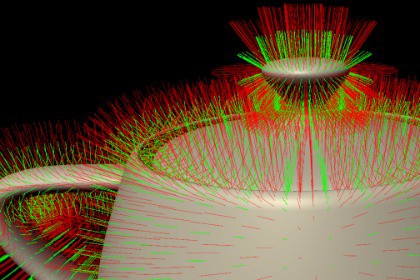
Visualize face normals, vertex normals and vertex tangents at runtime with customizable colors, lengths and multi-pipeline support.Mesh Normals & Tangents Visualizer is a runtime mesh debugging and visualization tool for Unity.The package allows developers, technical artists and 3D artists to inspect face normals, vertex normals and vertex tangents directly inside a running scene. Each visualization mode can be enabled independently, making it easier to identify incorrect normals, flipped faces, tangent problems, import issues and shading inconsistencies.The visualizer supports three different workflows:• Classic Material Mode – Apply the visualization material directly to a mesh.• Overlay Material Mode – Keep the original material and add the visualization as an additional material.• Camera Effect Mode – Add NormalsEffect to a camera to visualize supported renderers across the scene.Face normals, vertex normals and vertex tangents have separate color and line-length controls. Renderer selection can be limited by layer masks and the active camera culling mask. MeshRenderer and SkinnedMeshRenderer components are supported, including meshes containing multiple submeshes.The camera effect uses a cached renderer list and a reusable CommandBuffer. Runtime renderer changes can be applied manually through RefreshNow(), or the renderer list can be refreshed continuously when required.The included shaders contain dedicated implementations for the Built-in Render Pipeline, Universal Render Pipeline and High Definition Render Pipeline.Three demonstration scenes are included:• Classic• Camera Effect• Material OverlayMesh Normals & Tangents Visualizer is useful for debugging imported models, procedural meshes, normal generation, tangent generation, custom shaders, deformation systems and other geometry-related rendering problems.The package uses geometry shaders and is primarily intended for supported desktop graphics APIs.Render Pipeline Support• Built-in Render Pipeline• Universal Render Pipeline• High Definition Render Pipeline• Pipeline-specific implementations are contained inside the same shader files• No URP Renderer Feature required• No HDRP Custom Pass Volume requiredVisualization Modes• Face normals• Vertex normals• Vertex tangents• Each mode can be enabled or disabled independently• Independent color controls• Independent vector-length controlsUsage Modes• Direct visualization material• Additional overlay material• Camera-wide runtime visualization effectRenderer Support• MeshRenderer• SkinnedMeshRenderer• Multiple submeshes• LayerMask filtering• Optional camera culling-mask filtering• Optional automatic renderer-list refresh• Runtime RefreshNow() APIIncluded Scripts• NormalsEffect.cs• SceneAutoTransition.cs for the included demonstration sequenceIncluded Custom Shaders• Ogxd/Normals• Ogxd/BlitNormals Shader Features• Face-normal line generation• Vertex-normal line generation• Vertex-tangent line generation• World-space vector calculation• Support for non-uniformly scaled objects• Transparent vector rendering• Private depth-mask pass• Separate Built-in, URP and HDRP SubShaders• Local shader variants for visualization modesCamera Effect Features• Runtime CommandBuffer rendering• Built-in CameraEvent integration• Scriptable Render Pipeline camera callback support• Reusable temporary RenderTexture• Cached renderer collection• Automatic viewport-size handling• Runtime material cleanup• Runtime geometry-shader support validationIncluded Demo Scenes• Demo Classic• Demo Effect• Demo OverlayIncluded Demo Content• Utah Teapot demonstration mesh• Example visualization material• Third-party attribution noticePlatform Requirements• Geometry shader support is required• Primarily intended for supported desktop graphics APIs• Common supported targets include DirectX, desktop Vulkan and desktop OpenGL Core• Metal and many mobile graphics APIs do not support this geometry-shader techniqueLimitations• Not designed for mobile platforms without geometry shader support• The target GPU and graphics API must report geometry shader compatibility• Runtime scene changes require RefreshNow() unless automatic renderer refresh is enabled

