






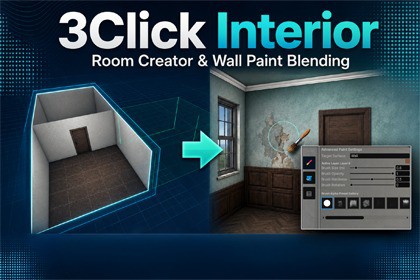
3Click Interior: Fast Room Builder & Layer Painter
Rip Vertices Studio
$19.24
$38.49
50%OFF
(no ratings)
Jump AssetStore
Instantly spawn walls, floors, and ceilings. Real-time Layer painting directly on floors, walls, and ceilings. Bevel (normal-based edge softening). Instantly spawn windows&Doors with holes in walls!Works with Unity 2022.3.6 and Unity 6+( If you find any important error please contact me )⚡ 3-Click Room Generation: Instantly spawn walls, floors, and ceilings using simple, intuitive handles in the Scene View.🎨 Real-Time Material Painter: Paint up to 8 distinct texture layers directly onto your floors, walls, and ceilings. It is completely resolution-independent and non-destructive.Dirt Mask Overlay: Blend customizable dirt, dust, or grunge onto surfaces with noise breakup.✨ Advanced Custom Shaders (URP & HDRP):Triplanar Mapping: Textures blend seamlessly across coordinates with no UV-stretching.Pseudo-Bevel: Smooths out hard wall/floor corners by dynamically bending normals, giving a rounded fillet look without adding polygons.Parallax Occlusion Mapping (POM): Adds incredible depth and displacement to your materials.Separate Roughness workflow: Optimize texture memory by toggling separate slots for roughness maps.📦 Structural Prefab Baker: Instantly freeze your procedural layout into an optimized, static prefab structure containing a clean room mesh shell, shadow casting shell, individual fixtures (windows, doors, moldings) as children, and lights.💡 Integrated Room Lighting: Automatically creates room point lights to keep your scene lit out-of-the-box.Getting Started (Quick Start Guide)Getting started with 3Click Interior is extremely simple:Create the Modeler: Right-click in the Hierarchy window and select 3Click Interior -> Create Modeler (or go to GameObject -> 3Click Interior -> Create Modeler).Locate the Toolbar: Look at the left side of your 3D Scene View. You will see the Interior Modeler Overlay Toolbar (if it's not visible, enable it via the Overlay menu by pressing Space or clicking the overlay icon in the Scene View header).Choose Your Tool:Wall Tool: Click to place corner points in the Scene View to draw your room layout. Double-click or press Enter to finalize the room.Extrude Tool: Click and drag wall faces to easily expand, resize, or shape your rooms.Add Fixtures: Assign windows, doors, baseboards, or ceiling moldings from your preset libraries. The system automatically handles wall openings and places fixtures in their correct locations.Paint Your Surfaces:Switch to Painter Mode in the Modeler's inspector.Pick a surface (Floor, Wall, Ceiling).Select one of your 8 configured material layers.Left-click and drag in the Scene View to paint textures.Bake the Asset: Once you are happy with the layout, click Bake Static Prefab in the Inspector. Choose a save path to freeze the room geometry and create a fully-fledged, optimized prefab containing the shell mesh, doors/windows as child objects, and lights.LINK TO DOCUMENTATION: https://sites.google.com/view/3clickinterior/home?authuser=2See also the other plugins:3ClickInterior Instantly spawn walls, floors, and ceilings. Real-time Layer painting directly on floors, walls, and ceilings. Bevel (normal-based edge softening). Instantly spawn windows&Doors with holes in walls! LINKQuick DestructionTurn existing static meshes into production-ready destructibles without authoring inner geometry, manually unwrapping cut-surface UVs, or creating a dedicated interior material.LINKFurBrushComplete URP & HDRP fur authoring & rendering tool. Live-paint length, density & flow in Scene view. Shells, GPU Strands & Fur Cards methods. Fast, mobile-ready & optimized for PC/VR.LINKPhysioBrushPhysioBrush is the ultimate secondary motion tool for Unity. Intuitive vertex painting workflow. Add hair,First release tail, and jiggle physics to any character.LINKEasyLineDeform complex meshes & nested prefabs in real-time. Full ProBuilder supports. Native Longitudinal Cut subdivisionsLINK### Technical details**Unity Compatibility & Version Support:*** **Unity Version:** Compatible with Unity 2022.3 LTS (specifically tested and validated on version 2022.3.62f3+) and all newer versions, including Unity 6 (6.3+).* **Assembly Definitions:** Clean structure using assembly definitions (AsmDef) to reduce compile times and keep editor/runtime scripts separated.**Render Pipelines Support:*** **Fully Multi-Pipeline Compatible:** Supports Built-in (Standard) Render Pipeline, Universal Render Pipeline (URP), and High Definition Render Pipeline (HDRP).* **Dedicated Custom Shaders:** Includes specialized shaders for multi-layer material rendering (handling roughness, parallax mapping, heights, and optional tessellation) optimized individually for Standard, URP, and HDRP.**Core Modeler Features:*** **Interactive Scene View Tooling:** Extrude walls, create rooms, drag faces, and sculpt layouts using an intuitive in-editor overlay canvas.* **Procedural Mesh Generation:** Instantly creates watertight room geometry (rooms, corridors, stairs), customized wall heights, ceilings, baseboards, and window/door openings.* **Flexible Openings & Fixtures:** Auto-cut openings for doors, windows, and passages. Attach doors, windows, and custom props/furniture linked dynamically to specific rooms.**Advanced Painting & Material System:*** **Multi-Layer Blending:** Supports up to 4 layers of texture coordinates and textures (Albedo, Normal, Roughness, Metallic, Height/Displacement maps) for floors, walls, and ceilings.* **In-Editor Painting Toolset:** Includes Paint Brush, Bucket (fill), and Grid-based painting tools.* **Dirt Mask System:** Apply procedural wear and tear using custom dirt maps, tiling controls, custom dirt colors, strength, and smoothness-reduction parameters.**Performance & Optimization:*** **Static Batching:** Generates clean, optimized static meshes out of the box.* **Lightmap-Ready:** Automatic UV2 mapping generation for quick, high-quality lightmap baking.* **Chunk-Based Split Maps:** Segmented paint data keeps texture memory footprint minimal by storing textures on a per-room/per-chunk basis.* **Platform Optimization:** Tailored shaders and code optimized for Mobile, PC, VR, and Consoles.**Package Contents:*** **Core Modeler Scripts:** Complete Editor & Runtime C# codebase.* **Custom Shaders:** Multi-layer parallax and roughness shaders (built-in, URP, HDRP).* **Asset & Demo Files:*** **2 Demo Scenes:** Includes complete scene setups with full lighting configurations for URP and HDRP.* **Brush Alphas:** 14+ brush alpha textures (soft, hard, noise, star, square, and specialized patterns) for precise vertex/texture painting.* **Texture Assets:** Custom textures for dirt maps, baseboards, window frames, and glass.Support in code writing.

