






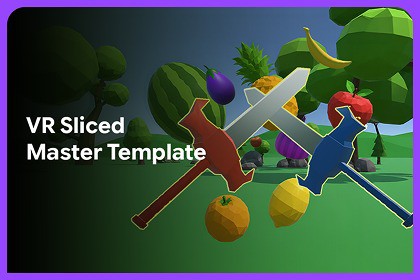
A VR sword-slicing game template where players use red and blue swords to slice matching fruits and vegetables, score points, and survive an increasingly fast-paced timed challenge.This is a game template and is compatible with Built-in, URP, HDRP, and Custom Render Pipeline projects.The gameplay systems are render-pipeline independent. Depending on your selected render pipeline, you may only need to update or convert materials/shaders for proper visual appearance after import.VR Slice Master Template is a complete Unity VR sword-slicing game template for creating immersive fruit, vegetable, and object-cutting gameplay. Players use virtual swords to slash and slice spawned objects in a VR environment, with smooth sword mechanics, physics-based cutting, responsive VR controls, score tracking, timer-based gameplay, and increasing spawn difficulty.The gameplay uses two sword types: the Red Sword slices red-type objects, such as vegetables, while the Blue Sword slices blue-type objects, such as fruits. Correct slices reward the player with points, while incorrect slices apply a score penalty. Objects spawn from configurable spawn points and become faster over time, creating an engaging arcade-style VR challenge.The template includes reusable systems for object spawning, sword setup, scoring, audio, VR hand handling, menu input, gameplay canvases, and shader conversion support for different render pipelines. It is designed to help developers quickly build VR slicing, action, arcade, and reflex-based games in Unity.✨ Key FeaturesVR sword-slicing gameplay templateRed and blue sword-based object matching systemPhysics-based slicing and object cuttingReusable mesh slicing system for custom meshes and prefabsEasy integration of sliceable objects with minimal setupScore system with correct slice rewards and wrong slice penaltiesTimer-based arcade gameplayDynamic object spawning with increasing challengeConfigurable fruits and vegetables spawning listsFloating score feedbackVR hand, ray, sword, and animator handlingPause menu support through VR controller inputGameplay UI canvas management for start, gameplay, pause, options, and game-over screensBackground music and slicing sound effect supportXR Device Simulator support for editor testingMaterial Shader Switcher tool for Built-in, URP, and HDRP compatibilitySuitable for VR arcade, slicing, reflex, and action gamesCore SystemsVR sword-slicing gameplay systemRed and blue sword/object matching systemPhysics-based slicing with cut force supportTrigger-based slice detection using collidersReusable slicing framework for custom meshes and prefabsEasy setup process for creating new sliceable objectsStart and end slice point setup for accurate sword cuttingCross-section material support for sliced object surfacesGameplay FeaturesTimer-based arcade gameplayCorrect slice score and wrong slice penalty systemCurrent score, high score, and floating score feedbackDynamic object spawning with adjustable spawn delay and forceFruit and vegetable prefab lists for easy content setupSpawned object tracking during gameplayVR & Input FeaturesBuilt for Unity VR projectsSupports XR Plug-in ManagementOculus setup support for Android VR buildsVR hand ray interaction supportLeft and right sword reference setupVR hand animator and transform handlingVR controller menu button support for pause/menu inputXR Device Simulator support for testing inside the Unity EditorUI, Audio & ToolsStart, gameplay, pause, options, and game-over canvas supportCanvas alignment system for VR gameplayBackground music supportSlicing sound effect supportMaterial Shader Switcher tool for fixing materials after switching render pipelinesSuitable for VR arcade, slicing, reflex, and action gamesRequirementsUnity Version: Unity 2022.3 LTS or newerPlatform: VRXR Setup: Enable Oculus under Edit > Project Settings > XR Plug-in Management > AndroidRender Pipeline: Compatible with Built-in, URP, and HDRP using the included Material Shader Switcher toolSupport and FeedbackWe value your feedback and are here to help!Reach out to 300 Mind via our contact page, email us directly, or join our Discord community for support, updates, and discussions.Please include your Unity version, VR device/build target, issue details, and reproduction steps when reporting bugs.Our team is ready to assist with any questions regarding setup, implementation, or customization.

