






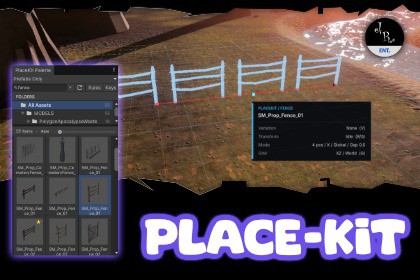
Modernizing Unity's world building workflow to be faster, with support for Blender like shortcuts, and bringing new never seen before features to make your map creation faster than ever before.-------------------------------------------------SUPPORT – QUESTIONS - NEWSHop on our Discord server.Follow on Twitter/X.You can read the documentation here.-------------------------------------------------Meet PlaceKitBuilding environments in Unity has worked the same way for a long time. Drag an asset into the Scene. Position it. Rotate it. Scale it. Duplicate it. Repeat.While working on our own games, we wanted something faster. Something designed around the way level designers actually build worlds today. So we created PlaceKit for ourselves.Now, we’re bringing it to everyone.Designed Around Three Ideas:Build faster.Create environments in less time than with Unity’s default placement workflow.Automate the repetitive work.Turn previously manual tasks into focused placement modes and simple shortcuts.Keep powerful tools approachable.More features should not mean more complexity. PlaceKit is designed to make sense from the moment you open it, without requiring a trip through the documentation first.That philosophy runs through everything we build. We want our tools to feel powerful and distinctive, but also intuitive, inspiring, and enjoyable to use. PlaceKit is our take on what object placement in Unity should feel like.FEATURES:Pick. Point. Place., Choose an asset from the PlaceKit Palette and move into the Scene. A live preview follows your cursor across the world. Click to place, then keep clicking to continue building.The PlaceKit Palette, Browse project models and prefabs through visual thumbnails. Search assets, mark Favorites, create Clusters, and navigate folders from a window designed specifically for environment building.Built For Every Surface, Switch between World Up and Surface Normal alignment. Objects can remain upright or naturally tilt to follow slopes, walls, and uneven terrain, with optional limits on how far they may tilt.Adjust Before You Place, Press R to rotate and S to scale. Use the mouse wheel for quick adjustments, select an axis with X, Y, or Z, or type an exact value for precise control.Instant Variation, Press V to randomize rotation and scale within ranges you define. Variation happens directly on the preview, so the object you see is exactly the object PlaceKit places.Area Placement, Populate an entire area with one click. Control brush size, density, rotation, and scale to quickly scatter vegetation, rocks, debris, and environmental details.Cluster Placement, Combine different assets into reusable groups. Place forests, prop collections, and environmental compositions while keeping every member grounded and independently varied.Fence Placement, Repeat modular assets in a straight line with control over axis, count, spacing, and direction. Each instance follows the height and orientation of the surface beneath it.Grid Snapping, Snap placements across the XZ, XY, or YZ plane. Configure cell size, origin, rotation, and reference space for tile maps, modular structures, and precise layouts.Placement Rules, Define where objects can appear. Exclude layers, prevent overlap with existing PlaceKit objects, constrain surface angles, and automatically organize placements in the Hierarchy.Complexity, Abstracted, PlaceKit brings placement, alignment, variation, scattering, snapping, organization, and cleanup into one simple workflow dominated by easy to memorize shortcuts.Open the Palette. Pick a model. Click in the world.Powerful when you need it. Simple from the moment you begin. Go create beautiful worlds.Happy Game Development,-------------------------------------------------SUPPORT – QUESTIONS - NEWSHop on our Discord server.Follow on Twitter/X.You can read the documentation here.-------------------------------------------------SUPPORTED UNITY VERSIONSUnity 2022.3.xUnity 6000.0.xUnity 6000.1.xUnity 6000.2.xUnity 6000.3.xUnity 6000.4.xUnity 6000.5.xSUPPORTED RENDERING PIPELINESURPHDRPBiRPSRP (Partial support, a shader graph conversion for the preview material may be needed)

