






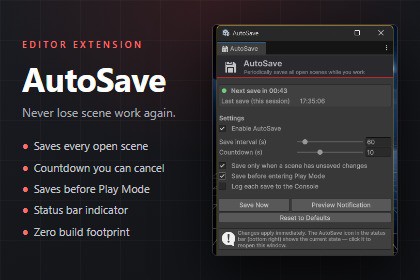
Automatic scene saving for the Unity Editor. Saves every open scene on a timer you control, with a countdown you can cancel. Editor-only, so nothing ships in your build.Lose an hour of level design to a crash and you only make that mistake once. Configurable Autosave saves every open scene while you work, so an editor crash, a power cut, or an accidental Play Mode entry never costs you more than one interval of work.It runs quietly in the background. A save icon in the status bar shows the current state at a glance, and a countdown notification appears before each save so you always have a moment to skip it. Nothing is hidden in a config file — every option lives in one window, and changes apply the moment you make them.FULLY CONFIGURABLEEvery behaviour is a setting, not an assumption:- Save interval, from 10 seconds to 10 minutes.- Countdown duration, from 0 to 30 seconds. Set it to 0 for silent, instant saves.- Save only when a scene actually has unsaved changes, so you are not writing identical files to disk and creating version control noise.- Save before entering Play Mode.- Log each save to the Console, off by default so a short interval never floods your log.Settings are stored per user in EditorPrefs, not in the project, so everyone on your team keeps their own preferences and nothing is committed to version control.SUITABLE FOR ANY PROJECTThis is an editor workflow tool, not gameplay content, so it is genre-agnostic and pipeline-agnostic. It is equally useful in a 2D mobile game, a VR title, or an architectural visualisation. Solo developers and teams both benefit — the only requirement is that you open scenes and edit them.SAFE BY DESIGNAutosave never writes during Play Mode, because changes made while playing are discarded by Unity and saving them would be wrong. It also stands down while the editor is compiling or importing.Every script lives in an Editor folder, so nothing compiles into your player build. Your build size is unchanged.Includes full offline PDF documentation with a step-by-step setup guide and a script reference for driving it from your own editor tooling.FEATURES- Automatic saving of all open scenes via EditorSceneManager.SaveOpenScenes().- Configurable save interval: 10 to 600 seconds.- Configurable countdown notification: 0 to 30 seconds. Set to 0 to disable the notification.- Dirty-scene check: optionally skip the save when no open scene has been modified.- Save-on-Play: optionally save all open scenes when entering Play Mode.- Status bar indicator with live state (waiting / counting down / disabled) and a tooltip showing time until next save and time of last save.- Optional Console logging, disabled by default.- Reset to Defaults in one click.- Never saves during Play Mode, compilation, or asset import.- Domain reload safe: the notification cannot be orphaned by a script recompile.TECHNICAL- Editor-only. All scripts reside in an Editor folder and are excluded from player builds. Zero runtime footprint, zero build size impact.- No third-party dependencies. Uses only built-in Unity Editor APIs.- All types are contained in the Elasticated.SceneAutoSave namespace.- Settings persist per user in EditorPrefs; nothing is written to your project or version control.- Public static API for driving saves from your own editor scripts.- Menu location: Window > AutoSave > Settings.SUPPORTED OS- Windows and macOS (Unity Editor). Linux Editor is untested.DOCUMENTATION- Offline PDF included in the package, containing a numbered setup guide, a full script reference, and troubleshooting.- https://elasticated.devAI assistance was used in creating this package. Specifically:• Source code — the tool was designed and originally written by hand. An AI assistant was then used to prepare it for release: wrapping all types in a namespace, moving the menu item, removing an external dependency, and adding the optional Console logging setting.• Documentation — the included PDF was drafted by an AI assistant from the finished source code.• Store listing — the summary, description, technical details, and the Chinese, Japanese and Korean translations were drafted with AI assistance.• Marketing images — composed from real, unmodified screenshots of the tool running in the Unity Editor. No AI-generated imagery was used.This package contains no AI-generated art, audio, or 3D models.

