






AI Sheets - AI Game Database & Localization
Glitch9 Inc.
$27.49
$54.99
50%OFF
(no ratings)
Jump AssetStore
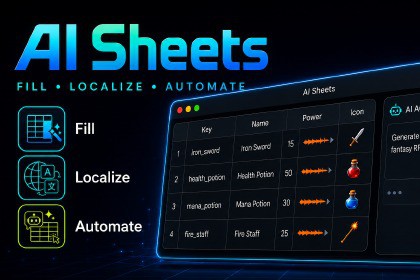
Build the table, say what you need — AI fills in your game database, icons, and localization. No pipeline to hand-build. Works in WebGL, mobile, and consoles.AI Sheets, AI Game Database & LocalizationAI Sheets turns a spreadsheet into a game database and localization system. Say what you need in plain language, and AI fills in the data, the icons, the translations — no coding, no setup, no manual typing row by row.Open it from Window > AI Sheets > Spreadsheet (Ctrl/Cmd + Shift + T).*Built on the free AIDevKit base package.*>> Online Documents>> Join Discord Server — get pre-release builds & hotfixes--------------------------------------------------------------------------------------## FAQ — the questions people ask before buying• *Does it work at runtime in a WebGL or console build?*Yes. The runtime Localization/Database API runs on every Unity target — Windows, macOS, Linux,iOS, Android, consoles, WebGL. (The editor authoring tools and AI generation are editor-only.)• *What if the AI generates something wrong — can I undo it?*Yes. Edits and deletes from the agent are risk-tagged so you review them before they run (or setit to always ask first). Every cell also keeps version history, so you can restore a previousvalue, or just undo/redo like any other change.• *Can I bring in data I already manage in Excel or Google Sheets?*Yes. Import and export CSV, TSV, XLSX, JSON, and Google Sheets, round-trip, in the same formatsyou already use.• *How do I use this data in my actual game code?*The Game Database Setup wizard generates a typed GameDB facade for you. It's two lines —`Database.LoadAsync()` → `Database.TryGet()`. You never write your own parser.---## The Data You Used to Type by Hand — Now AI Fills ItIf you don't even know where to start structuring your data, hand that part to the AI.* "100 weapons" → 100 rows with names, descriptions, and stats filled in* "50 shop NPC lines" → 50 rows, all at once* large requests are planned first, then filled in — no duplicate keys, no half-finished rows* generation reads your existing rows as examples, so new content matches your styleThe one-cell-at-a-time typing is gone.---## Icons, Voice, Sound — Generated Right in the TableIt's not just data.• add an icon column and AI generates an image for every item• set a per-column reference image so every icon matches your art style• edit generated images with a text instruction (AI inpainting)• generate voice lines (TTS) right inside the cell — sound effects and music too, with AIDevKit Pro• drive voice per row — read the speech text and voice from other columns• generated images and audio are saved as real assets in your project (Addressables supported)No separate asset pipeline to design — fill the table, and your game assets come with it.---## Translation, Without Building a Translation Pipeline* write in one language — AI fills in the rest* missing translations are found and filled in a single pass* AI translation (OpenAI, Anthropic, and more) / Google Translate / Microsoft Translator* compare providers side by side and apply the best result (Compare Translations)* track review status per translation: Initial → Translated → Reviewed → FinalNo API wiring, no endpoint to configure — pick a provider, and translation happens.---## Say It, and AI Edits the TableGive the agent a task in plain language and it edits the table directly.• "Fill in all the missing Korean translations."• "Create 20 items that follow this schema."• "Find every row where damage > 100 and flag it."Edits and deletes — the hard-to-undo ones — are risk-tagged so you can review them before they run,or switch approval modes (Ask Before Edits / Ask Before Delete / Edit Automatically). Conversationsare saved, so you can pick up where you left off.---## The Table Is Your Game CodeUse the tables you build directly in your game.• generate C# model classes from a table (PureCSharp or ScriptableObject)• a Game Database Setup wizard generates a typed GameDB facade — load everything with one call• load as typed objects at runtime: `Database.LoadAsync(...)` → `Database.TryGet(...)`• typos are caught at the table stage, before they break your gameNo separate data model to design by hand — the table structure becomes the code structure.---## What Is AIDevKit Sheets?An add-on package for AIDevKit. It adds a native spreadsheet window to Unity.Every table is built from the same Table > Column > Row > Cell model, and is one of two kinds:• Localization — a key column plus one value column per language• Database — typed columns that hold structured game dataA runtime API (`Glitch9.AI.Sheets`, async via UniTask) loads and queries the same tables while yourgame is running.---## Spreadsheet EditorA real spreadsheet tool, right inside Unity.* typed columns (primitives, enums, dates, colors, vectors, Unity assets, custom JSON classes, localized references)* multi-cell / multi-row / multi-column selection, copy & paste, find & replace (regex, whole word, in selection)* keyboard shortcuts (built-in guide window), undo / redo* per-cell notes, cell version history (restore previous values)* Column Manager and per-table settings* start from table templates (Item / Character / Quest / Skill databases, Localization) or save your own* JSON snapshots (Ctrl+S), duplicate-key check, one-click table clean-up* merge-conflict resolution when re-importing changed data* AI text revision — rewrite the cells you select with an instruction---## More on LocalizationIn the editor:• add and manage language (locale) columns• detect missing translations and fill them in one pass• supply translation context (Contextual Keys) — including plural, gender, and platform variants (mobile / pc / xbox)• compare translations across languages and providers for QA (Compare Translations)• generate keys from scene Text / TMP components (Scene Text Localization)• extract hardcoded strings from C# scripts into a localization table• export every unique character to build TMP font atlasesAt runtime (static `Localization`):• initialize with `Localization.InitializeAsync()`, switch language via `CurrentLocale`• `"key".Tr()` + chain `.Count(int)` / `.Gender(...)` / `.Format(...)` / `.Fallback(...)`• localize dates: `DateTime.Tr(...)`, `DayOfWeek.Tr()` — and enums via `enum.Tr()`• localized assets in code: `"key".TrAsset()`, `image.SetLocalizedSprite(...)`, and more• drop-in components: TextLocalization (UI.Text / TextMesh / TMP_Text), Sprite / Texture / Material / Audio Localization (extensible AssetLocalization base for your own types)• LocalizationManager — auto-loads on Awake (start with no code)• Realtime Translation at runtime — `"text".TrRealtime()` with memory / persistent / negative cachingbuilt in---## More on Database• define columns with real data types and validate them• reference Localization keys directly from Database cells (Cross-Reference)• generate C# model classes from a table (PureCSharp / ScriptableObject)• export a table to ScriptableObject assets• load from many sources: CSV, TSV, JSON, Google Sheets, TextAsset, file path, or URL• asset-reference cells resolve through direct references or Addressables---## Import / Export• CSV, TSV, Excel (XLSX, round-trip), JSON (round-trip)• XLIFF 1.2 / 2.0 (for professional translation pipelines)• ScriptableObject (round-trip)---## Google Sheets SyncPush to and pull from Google Sheets directly in the editor, keeping a shared spreadsheet and yourUnity project in sync. You don't need to know how to set up Google API auth yourself — an in-editorguide walks through sharing / access setup step by step.---## What You Can Build• AI-assisted localization pipelines• item / skill / quest / dialogue databases → loaded at runtime as typed C# objects• procedural content tables filled by AI• data validation and QA workflows• runtime localization + Realtime Translation---## Supported ProvidersAI features use the providers you configure in AIDevKit (OpenAI, Anthropic, and more).Translation additionally supports: Google Translate, Microsoft Translator.> > See all supported providers---## SamplesSix demo scenes are included: locale switching, runtime Realtime Translation, a GameDB databasedemo, and manual loading from CSV, Google Sheets, and ScriptableObject.---## Note on Bulk GenerationAI row generation is capped at 100 rows per request. Larger requests are split across multiplecalls automatically, and new rows are checked against existing keys so nothing collides.---## AI/ML Training NoticeThis package does not train, validate, or develop AI/ML models. It does not use Unity Offerings, Asset Store content, or Unity-generated outputs for AI/ML training. All AI requests are initiated by the user and sent only to user-configured providers.---## Third-Party NoticesThis asset uses UniTask and the Sylvan.Data libraries (Sylvan.Data.Csv for CSV/TSV, Sylvan.Data.Excel for XLSX) under the MIT License. See `Third-Party Notices.txt` in the package for details.## Supported PlatformsRuntime Localization and Database run on all Unity targets (Windows, macOS, Linux, iOS, Android, Consoles, WebGL).Editor authoring tools (the Spreadsheet window, import/export, code generation, AI generation) run in the Unity Editor. AI calls are sent to the providers you configure; runtime Realtime Translation requires the relevant provider key.---This asset uses UniTask under MIT License. See the Third-Party Notices.txt file in the package for license details.Editor Requirements• Unity 6000.0 or newer• Editor runs on Windows, macOS, and Linux (any platform the Unity Editor itself supports)Runtime Platform Support• Runtime Localization and Database APIs run on every Unity build target: Windows, macOS, Linux, iOS, Android, consoles, WebGL• Editor-only features (Spreadsheet window, import/export, code generation, AI generation) do not run outside the Unity EditorRequired Dependencies• AIDevKit (free base package) — required, bundled• UniTask (com.cysharp.unitask) — required, bundled• Newtonsoft.Json (com.unity.nuget.newtonsoft-json) — required, bundledOptional Dependencies• TextMeshPro (com.unity.textmeshpro) — enables TMP_Text / TextMeshPro localization components• Addressables (com.unity.addressables) — enables generated-asset → Addressable group support• AIDevKit Pro (com.Glitch9.AI.pro) — enables sound-effect and music generation; not required for text, translation, image, or voice (TTS) featuresSource Code• Full C# source included for all Glitch9 assemblies (5 asmdef modules: Runtime, Editor, Editor.Addressables, Runtime.Addressables, Samples)• Third-party libraries ship as precompiled DLLs: Sylvan.Data.Csv.dll, Sylvan.Data.Excel.dll (Runtime/Plugins), both MIT-licensedData / File Formats• Import & export: CSV, TSV, Excel (XLSX, round-trip), JSON (round-trip), ScriptableObject (round-trip)• Localization interchange: XLIFF 1.2 / 2.0• Cloud sync: Google Sheets (push/pull from the editor)AI & Translation Providers• AI generation (text, images, voice) and AI translation use providers configured in AIDevKit — currently OpenAI, Anthropic, and others (see AIDevKit's supported-providers list)• Translation-only providers: Google Translate, Microsoft Translator• Requires an internet connection and a user-supplied API key per provider; no AI/network call is made without a user-initiated requestGeneration Limits• AI row generation is capped at 100 rows per request; larger requests are split into multiple automatic calls, checked against existing keys to avoid duplicatesNetworking• Editor: outbound HTTPS calls to whichever AI/translation providers and Google Sheets API the user configures• Runtime: outbound HTTPS calls only when Realtime Translation is used; all other runtime Localization/Database reads are local (no network required)Scripting Backend• Compatible with both Mono and IL2CPPSamples Included• 6 demo scenes: locale switching, runtime Realtime Translation, a GameDB database demo, and manual loading from CSV, Google Sheets, and ScriptableObjectNot Included• No render pipeline assets, shaders, or 3D content — this is an editor authoring tool plus a data/localization runtime API, not a visual/rendering asset

