






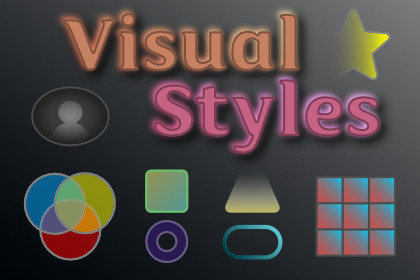
The visual-effects layer UI Toolkit doesn't ship: real gradients, drop/inset shadows, glows, shapes, and fade masks. Shader-free, theme-tokenized, animatable, applied to any element in one line.UI Toolkit can fill a box with a flat color and round its corners. It can't paint a multi-stop gradient, cast a real soft shadow, add a glow, draw a squircle, or fade an edge — the effects every modern interface leans on. The usual answers are pre-baked PNGs that don't scale, nine-slice sprites you re-export whenever a color changes, or custom shaders wired per render pipeline.Visual Styling adds those effects natively. Gradients and shapes are painted with Painter2D vector geometry; shadows and glows are CPU-baked to cached textures. No shaders, no materials, no render-pipeline coupling — it behaves the same on Built-in, URP, and HDRP. Apply an effect directly to an element, or define it once as a named token and reference it everywhere, so a whole UI restyles from a single set.Six families of effect.Gradients — linear, radial, and repeating, with multi-stop colors and per-stop alpha. Conic gradients — angular sweeps for color wheels, pie charts, and progress arcs. Shadows — drop and inset, with offset, blur, spread, color, and corner radius, stackable in layers. Glows — outer and inner, with radius, intensity, and spread. Shapes — rounded rectangle (per-corner), squircle, capsule, regular polygon, and ring, with solid or gradient fill and a stroke. Fade masks — directional soft-edge fades for scroll edges and vignettes.One line on any element.using KrookedLilly.UIToolkit.VisualStyling;myElement.SetGradient(GradientDefinition.Linear(45f, new GradientStop(Color.cyan, 0f), new GradientStop(Color.magenta, 1f)));myCard.AddShadow(ShadowDefinition.Drop(offset: new Vector2(0, 4), blur: 12f));myButton.AddGlow(GlowDefinition.Outer(color: Color.cyan, radius: 8f, intensity: 0.8f, spread: 0f, cornerRadius: 0f));Matching methods cover every family — SetShape, SetConicGradient, AddFadeMask, gradient borders, even per-character gradient text (on text elements) — each with a Clear/Remove counterpart.Or author in UXML.Every effect has a custom element — GradientElement, ShadowElement, GlowElement, ShapeElement, ConicGradientElement, FadeMaskElement — so you can compose visuals in UI Builder, or apply a token by attribute (gradient-token="brand-primary") or even a USS marker class. Three apply paths, same effects.Tokens that restyle everything at once.Define a gradient or a shadow stack once as a token with an id, collect tokens into a set, and activate the set. Every element that references a gradient or shadow token by id updates the moment the active set changes — your entire UI restyles from one place. Author tokens as ScriptableObjects in the editor, or build a set in C# at runtime with no assets at all. Glow tokens are also authorable and resolvable (and theme-swappable through the resolver), but glow is not yet wired to the C#/UXML/USS apply paths — apply glows directly via AddGlow.Themes and animation, built in.A theme resolver hook remaps token ids on the fly, so "card-shadow" can resolve to a light or dark variant with automatic fallback to the base — that's how the Theme Switcher integration reskins gradient and shadow tokens on a theme swap (glow tokens resolve through the same hook). And because effects are plain data, the Tween Engine integration animates them: cross-fade a gradient, lift a shadow, pulse a glow over time.Fast by design.Vector effects paint through generateVisualContent with no per-frame allocations. Baked shadows and glows are cached and nine-sliced, and the cache reference-counts textures that are currently on screen — so an animated effect can never evict and destroy a texture a static effect is still showing. Cold entries are trimmed to a budget.Six demo scenes included.A gallery scene for each family — gradients, shadows, glows, shapes, conic and repeating gradients, and fade masks — each also showing gradient borders, gradient text, tokens, and live theme switching where relevant. All render in-scene with no external art dependencies, the moment you open them.Part of the KrookedLilly UI Toolkit Components suite.Visual Styling works standalone, but it's also the visual foundation for the suite. Cross-asset integrations ship disabled and are enabled from a single Tools, KrookedLilly, Setup window — no auto-magic and no hidden dependencies. Element Library uses it to sharpen standalone gradients to mesh quality and to add real shadows and glows to Card, Avatar, and StatusIndicator; the Theme Switcher reskins its effects on a theme swap; the Tween Engine animates them.Full C# source, no DLLs.XML documentation on every public API. The only dependency is UI Toolkit itself — no shaders to wire up, no render features to configure, no popups and no login on import.EffectsGradients: linear, radial, repeating (wrap / mirror); multi-stop with per-stop alpha (GradientDefinition)Conic gradients: angular sweep, baked; color wheels, pie sweeps, progress arcs (ConicGradientDefinition)Shadows: drop and inset; offset, blur, spread, color, corner radius; stackable (ShadowDefinition)Glows: outer (underlay) and inner; radius, intensity, spread (GlowDefinition)Shapes: rounded rect (per-corner), squircle, capsule, regular polygon, ring; fill + stroke (ShapeDefinition)Fade masks: directional soft-edge fades, per-edge length (FadeMaskDefinition)Apply pathsC# extension methods on VisualElement (SetGradient, AddShadow, AddGlow, SetShape, AddFadeMask, SetConicGradient, gradient border/text, plus Clear/Remove)Custom UXML elements for every family (UI Builder authorable)Gradient/shadow token application by C# call, UXML attribute, or USS marker class (glow tokens are authorable + resolvable but not yet wired to these apply paths)Tokens and themesGradientToken, ShadowToken, GlowToken (id-keyed); collected into a VisualStylingTokenSetVisualStylingTokens static registry: SetActiveSet, RefreshAll, O(1) resolve, change eventsThemeResolver delegate seam for per-theme id remapping with base-id fallbackCode-first authoring (SetLinear / SetShadows / SetGlow / SetTokens) — no assets requiredPerformanceVector tier (gradients, shapes) via Painter2D + generateVisualContent — zero-allocation paintingBaked tier (shadows, glows, conic) cached and nine-sliced, with reference-count pinning of on-screen textures and budget-based trimmingIntegrations (optional, gated, ship disabled)Element Library — KROOKEDLILLY_ELEMENT_LIBRARY_VISUAL_STYLING_INTEGRATION: Badge, RangeSlider, SkeletonLoader, and ColorPicker already render gradients standalone (baked) and sharpen to mesh quality through this integration; Card, Avatar, and StatusIndicator add real shadows and glowsTheme Switcher — KROOKEDLILLY_THEME_SWITCHER_VISUAL_STYLING_INTEGRATION: theme swaps re-resolve effect tokens to per-theme variantsTween Engine — KROOKEDLILLY_TWEEN_ENGINE_VISUAL_STYLING_INTEGRATION: animate gradients, shadows, and glows over timeIncluded demosGradient, shadow, glow, shape, conic/repeating, and fade-mask galleriesGradient borders and per-character gradient textToken and theme-switch demo with live re-resolutionCompatibilityUnity 6+ (6000.0 and newer)UI Toolkit (com.unity.modules.uielements)Shader-free Painter2D + baked-texture rendering — works on Built-in, URP, and HDRPFull C# source, no DLLsXML documentation on all public APIsOnly dependency is UI Toolkit; optional, gated cross-asset integrationsAI (Claude Code) was used as a development assistant throughout the package creation process. This includes code generation, architecture design, writing unit tests, documentation authoring, and debugging. All AI-generated code was reviewed, tested, and validated by the developer. The final package is 100% human-supervised C# source code with no AI runtime components.

