






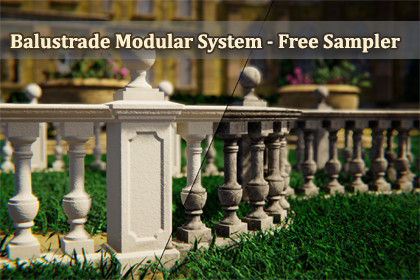
Tested in Unity 6.0 LTS, 6.3 LTS and 6.5 .Balustrade Modular System LITEBuild complete balustrade systems directly in the Scene View - no manual prefab placement, no tedious alignment. The Balustrade Modular System is an Editor tool that lets you construct, extend, and modify modular balustrades through a guided, snap-based workflow. Just click, preview, and build.This is the free LITE version: the complete Editor tool plus a content subset - both visual variants (V1 & V2), 3 of the 12 baluster styles, 1 pillar top, and one finish in New and Worn condition. Everything the full version adds stays visible in the tool behind a padlock, so you always see what you are missing. Try the entire workflow in your own project, then unlock the rest in the full version.✨ Key Features- Scene View Construction:Build balustrades entirely within the Scene View. Direction arrows guide your placement and a real-time ghost preview shows exactly what will be built before you commit.- Automatic Placement Validation:The ghost start pillar automatically detects invalid surfaces - slopes, obstacles, or objects that would prevent proper construction. Invalid placements are visually indicated before you even click. When no surface is detected, the pillar automatically snaps to Y0.- Continue Build Mode:Extend any existing balustrade from its end pillars. Select a pillar, pick a direction, and keep building - the system seamlessly connects new segments to your existing structure.- T-Junctions & Branching:Build branches from middle pillars (M) and corner pillars (C). The tool automatically replaces the pillar with the correct T-junction piece and lets you continue building in a new direction. Works with both the V1 and the V2 variant.- Corners & Curved Rails:90° corners and curved rails are fully integrated into the building workflow. Inner and outer arcs are handled automatically depending on your build direction.- Close Loop:Connect the end of a balustrade back to an existing pillar to form a closed circuit. The system detects proximity, highlights the connection in green, and replaces pillars with the correct junction type on commit.- Inner/Outer Arc Swap:Select a curved rail and click the button that appears above it in the Scene View to mirror it between inner and outer arc orientation. Neighbouring pillars are automatically replaced (M↔C) and re-oriented. Works with all pillar types and both V1 and V2 variants.- Variant Switching (V1 ↔ V2):Switch entire balustrades between two visual variants with a single click. Each variant comes with 1 New and 1 Worn texture set in this free sampler. V1 and V2 use different pillar sizes and rail lengths - the system recalculates all positions using topology-aware repositioning to keep everything aligned. Works reliably even when rail segments have been deleted.- See What the Full Version Adds:The carousels step through every baluster style, pillar top and finish of the full package, not only the ones included here. Entries that are not part of this free version keep their preview image in full colour and carry a golden padlock, so you can see exactly what you would get before you decide. One click on a padlock opens the full package.- Smart Selection & Deletion:Clicking a rail automatically co-selects its connected pillars for visual clarity. Shift-click to multi-select rails - pillars between them are highlighted automatically. Delete one or multiple rails in a single action; all affected pillars are repaired automatically.- Pillar Protection:Pillars cannot be accidentally deleted. The system intercepts delete commands on pillars to prevent broken balustrades.- Full Undo/Redo:Every action - including full Continue Build sessions - is grouped into a single undo step. Ctrl+Z reverts the entire operation, not individual pieces.- Slope Tolerance:A built-in 1° slope tolerance ensures balustrades are only placed on flat surfaces, maintaining architectural realism.- Performance-Friendly:The entire balustrade uses only 3 materials regardless of length or complexity. Combined with Unity's Static Batching, draw calls stay minimal even in large scenes.🧱 Pillar TypesThe system includes five pillar types that are automatically managed during construction:- End Pillar (E) - Placed at the start and end of every balustrade segment- Middle Pillar (M) - Connects two rails in a straight line- T-Junction Pillar (T) - Connects three rails for branching layouts- Corner Pillar (C) - 90° connection between two rails- Corner 45° Pillar (C45) - 45° connection between two rails🎯 Built for BalustradesPurpose-built for modular balustrade construction - every feature, from snap logic to automatic pillar type management, is designed around how balustrades actually work in architecture.📦 What's Included- Complete Editor tool - no runtime dependencies- Both visual variants (V1 & V2)- 3 of the 12 baluster styles, straight and curved- 1 pillar top- 2 Texture Sets: 1 New (clean) and 1 Worn (weathered)- All pillar types (End, Middle, T-Junction, Corner, Corner 45°) plus straight and curved rails- 23 prefabs, each with 3 LOD levels and a collider- Full Built-In, URP, and HDRP render pipeline support - materials for your active pipeline are assigned automatically on import⬆️ Get the Full VersionNeed the full range? The full Balustrade Modular System adds all 12 baluster styles, 8 texture sets (4 New + 4 Worn) and 4 pillar tops - exact same Editor tool and workflow: Balustrade Modular System***Background Environment by Leartes Studios***🧱 Topology (LOD0 / LOD1 / LOD2)🔹Balusters, straight:- Style 1: 3,922 / 1,860 / 257- Style 8: 2,214 / 989 / 98- Style 12: 2,004 / 760 / 56🔹Balusters, curved:- Style 1: 4,373 / 2,042 / 299- Style 8: 2,665 / 1,174 / 139- Style 12: 2,455 / 934 / 76🔹Pillars V1:- End: 406 / 198 / 36- Middle and Corner: 342 / 169 / 30- T-Junction: 278 / 138 / 22- Corner 45°: 460 / 224 / 41🔹Pillars V2:- End: 252 / 122 / 20- Middle and Corner: 236 / 114 / 19- T-Junction: 220 / 106 / 17- Corner 45°: 318 / 154 / 26🔹Top:- Top 1: 350 / 164 / 25Baluster counts are the V1 prefabs; their V2 counterparts differ by less than 1%.🎨 PBR Textures- 6x BaseColor/Albedo Map (2048x2048) - All Pipelines- 6x Normal Map (4096x4096) - All Pipelines- 6x Metallic/Smoothness Map (2048x2048) - URP & Built-In- 6x Ambient Occlusion Map (2048x2048) - URP & Built-In- 6x Mask Map (2048x2048) - HDRP🧩 Materials- blstrs_new1_MAT- pillars_new1_MAT- raitop_new1_MAT- blstrs_worn1_MAT- pillars_worn1_MAT- raitop_worn1_MAT- GhostPreview_MAT🧾 Texture Format: PNG📦 Mesh Format: FBXThe scripting was created with the assistance of AI tools.

