






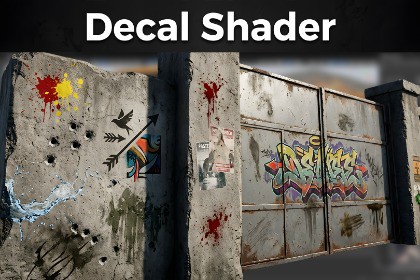
Add realistic decals to any weapon, prop, car or environment object with minimal setup. Decal Shader is a flexible and performance-friendly solution that allows developers to quickly apply high-quality decals without the complexity of traditional decal systems.This package adds decal functionality to the Standard Lit Material. Its main advantage over traditional decals is that it performs projection along a single axis and avoids additional draw calls, resulting in better performance.In addition, since the decal shader is integrated with the main Lit shader, it can reuse the textures of the underlying object. This allows for more realistic results. Its only disadvantage is that, since it samples along a single axis, it can only be used on flat surfaces. For example, you would not use it on the corner of a wall. If you do, texture stretching will occur.If you do not want to use a material-based decal shader, that's fine. The package also includes a separate decal shader that can be used with decal objects. However, it does not support the features listed below. In addition to the Base Color and Normal inputs provided by Unity's default shader, it adds Metallic/Smoothness inputs and color tinting parameters.FeaturesEasy Integration – Apply decals to weapons and objects in just a few steps.Realistic Visuals – High-quality blending and projection for convincing surface details.Multiple Blend Modes – Customize the appearance of decals with various blending options.PRB Support – Supports Base Color, Normal Map, Metallic, and Smoothness maps.Advanced Parameters – Fine-tune decal size, opacity, projection, fading, and more.Works on Any Mesh – Supports props, environment assets, and custom models.Highly Customizable – Adapt the shader to different art styles and project requirements.Performance Conscious – Designed for real-time applications and games.URP/HDRP CompatibilityPerfect ForWeapon customization systemsCar modifier systemsBullet holes and impact marksDirt, scratches, and wear effectsFor adding stickers and graffiti-like texturesProp detailing* The example textures were generated using AI and further edited in Photoshop. These textures(it's in video) are not required for the package to function; they are included solely as examples to demonstrate the shader's capabilities.LIMITATIONS:Mesh decal materials support only one texture per material. To use multiple textures, use the decal shader designed for the decal object included in the package. This enables multiple decals to be projected using a decal projector, but blend modes are not supported.SUPPORTED:Unity 6.x is supported. The package will likely work with Unity 2021, 2022, and 2023 as well; however, these versions have not been tested.

