






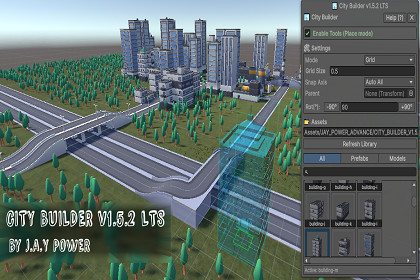
A simple, lightweight Editor tool by JAY POWER that lets you paint and snap prefabs directly into your scene. Built to speed up your level design workflow with zero runtime overhead.- This is a pure Editor Extension. It works natively on both Windows and macOS Unity Editors.- The prefabs placed using this tool have zero runtime overhead and are 100% compatible with all target platforms (PC, Mobile, WebGL, VR/AR, and Consoles).- Demo scene models are provided with Standard materials, but they will seamlessly auto-convert if you are using URP or HDRP in Unity 6+.Hey everyone, JAY POWER here. I built City Builder because honestly, dragging and dropping hundreds of props, roads, and buildings into the hierarchy by hand gets exhausting and slows down development. This is a custom Editor tool designed to fix that. It gives you a clean, simple HUD right inside your Scene View. You just select your prefabs, paint them, and snap them onto a grid without fighting the Unity interface. Whether you are blocking out a quick prototype in a weekend jam or laying out a massive final map, this tool gets out of your way and lets you build fast.The best part? It is purely an Editor script. That means it won't add a single byte of memory or performance cost to your final game build. To make sure you can start testing it the second you hit import, I've packed in a starter set of free CC0 3D models from Kenney. But the tool is totally flexible—you can swap out my demo models and plug in your own custom prefabs in just a few clicks.- Tool Type: Custom Editor Extension / Scene GUI.- Performance: 100% Editor-only. It doesn't run in your final build, meaning zero garbage collection and zero runtime overhead.- Pipelines: Works out of the box with Built-in, URP, and HDRP (the included demo materials will automatically upgrade in Unity 6+).- Compatibility: Runs great on both Windows and macOS Unity Editors.- What's Included: The City Builder scripts, plus a starter pack of CC0 Kenney models (buildings, trees, roads) pre-configured and ready to paint.- Source Code: Full C# source code is included. Feel free to open it up and tweak the tool to fit your studio's specific workflow.

