






Multiplayer Starter Kit - Lobby, Matchmaking & Player Sync
Setry Production
$55.00
$110.00
50%OFF
(no ratings)
Jump AssetStore
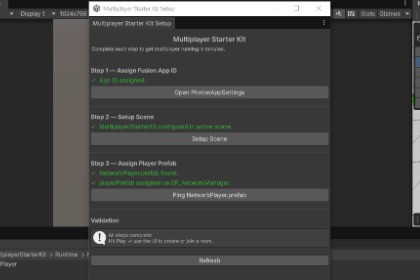
Production-ready Plug-and-play multiplayer kit with lobby, matchmaking, and player sync. Working session in under 3 minutes.Requires Unity 6.3 LTS or newer.Get multiplayer running in under 3 minutes with the Multiplayer Starter Kit.New to networking? Follow the 3-button Setup Wizard and have players connected without writing a single line of code.Experienced developer? Every script is fully editable and documented — customize the architecture exactly the way you want.FEATURES• One-click Setup Wizard — configure your scene in 3 button clicks• Host / Client / Quick Match modes out of the box• Automatic player spawn, color assignment, sync, and despawn• Networked player movement — ready to extend with your own system• Clean UI: Main Menu, Create Room, Join Room, In-Game HUD• Grid floor material generator included• Fully documented source code with XML summaries and Inspector tooltipsREQUIREMENTS• Photon Fusion 2 SDK (free download at photonengine.com)• Unity Input System package (com.unity.inputsystem 1.18.0+)• TextMeshPro — included in Unity 6 via UGUI, no separate install needed• Unity 6.3 LTS or newer• Universal Render Pipeline (URP)ARCHITECTUREBootstrap → NetworkManager → LobbyManager → UIManagerOne clean call path. No spaghetti. Easy to extend.SUPPORTSee the included README.md for setup guide, API reference, and troubleshooting.One-click Setup Wizard — configure a multiplayer scene in 3 clicksHost, Client, and Quick Match session modes out of the boxAutomatic player spawn, color assignment, network sync, and despawnNetworked player movement — ready to extend with your own systemClean UI flow: Main Menu, Create Room, Join Room, In-Game HUDGrid floor material generator includedFully documented source code with XML summaries and Inspector tooltipsBuilt on Photon Fusion 2 (Host/Client mode), Unity 6.3 LTS, URPSimple, linear call path: Bootstrap → NetworkManager → LobbyManager → UIManagerCore systems were designed and implemented with AI assistance, following Unity and Photon Fusion 2 best practices.

