






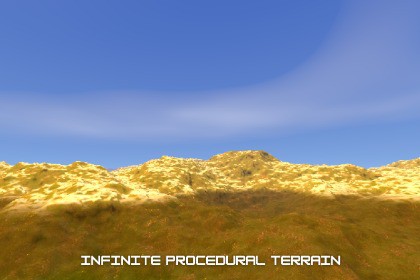
Tessaractic Infinite Procedural Terrain
TESSARACT LAB
$38.49
$60.49
36%OFF
(no ratings)
Jump AssetStore
Tessaractic is an infinite procedural terrain system for Unity. Running entirely on the GPU, it generates runtime landscapes, saving you from writing complex compute shaders and mesh builders.Tessaractic — Infinite Procedural Terrain is built exclusively for the Built-in Render Pipeline (BiRP) & URP using Unity's CG shader system (UnityCG.cginc, AutoLight.cginc).Recommended Unity version: Unity 2022.3.62f (LTS) or newer.External Object Shadow receiving is supported only in URP 1.0.0.Not compatible with HDRP.HDRP support are being evaluated for a future major version.Tessaractic is a high-fidelity, fully GPU-driven, infinite procedural terrain generation system designed exclusively for the Unity Built-in Render Pipeline & Universal Render Pipeline. By offloading the entire mesh generation and noise evaluation pipeline to the GPU, Tessaractic generates endless, geologically rich landmasses at runtime with zero pre-baking, zero heightmaps, and no CPU-side mesh bottlenecks.At its core, the system utilizes a proprietary octree subdivision algorithm (Frank's Equation) coupled with Fractional Brownian Motion (FBM) noise. This math produces organic terrain formations—such as overhangs, cliffs, and rolling hills—directly on the GPU using a highly parallelized Marching Cubes pipeline, which streams chunks seamlessly as the player moves, (No Dependencies)🎨 Is the Content Customizable?Yes, completely. Tessaractic is designed with a "Customize-Friendly" open-source philosophy where all 12 core files (C# scripts, HLSL compute shaders, and CG shaders) are fully exposed, commented, and editable.Customization options include:Inspector-Driven Mathematics: Instantly tweak the shape, frequency, detail levels, and layout of the terrain through Inspector fields (e.g., Terrain Scale, Octaves, Terrain Bias, Ground Push Factor, and Organic Smoothness).Flexible Terrain Shader: The custom triplanar terrain shader includes editable properties for slope-based material blending, per-biome height bands (e.g., transition from ground/rock to mountain snow), Parallax Occlusion Mapping (POM) depth control, and specular wetness simulation.Procedural Environment Stack: Tweak the atmosphere easily with dedicated managers for the Day-Night Cycle (progression speed, sun angle), Procedural Skybox (colors, gradients), and Procedural Clouds (altitude, density, wind speed).Deterministic Seeding: Feed any string seed into the generator to recreate identical landscapes deterministically.📖 Documentation👉 Click Here to View the Full 39-Page Documentation Guide https://tessaractlab.com/docs/Tessaractic_documentation.pdf🌐 Official Asset Website Run the Hardware Performance Estimator, watch the "Some Fragments of Our Journey" showcase, read more, and check developer updates at our official site:👉 https://tessaractlab.com📖 Detailed Technical Specs & Documentation:- Full Manual: https://tessaractlab.com/docs/Tessaractic_documentation.pdf## 🚀 Key Features* **GPU-Driven Voxel Pipeline:** 100% of terrain calculation, density field evaluation, and mesh extraction runs on the GPU via compute shaders, freeing up the CPU.* **Frank's Equation Octree Subdivision:** A specialized octree subdivision algorithm that generates organic rock formations, cliffs, and cave-like overhangs at runtime without requiring static heightmaps or pre-baked meshes.* **Complete Environment Suite:** Shipped with a synchronized environment stack containing:* **Day-Night Cycle:** Multi-parameter synchronization (sun intensity, sky colors, fog, and albedo boosts).* **Procedural Skybox:** Dynamic 3-way gradients, solar disc, moon phase shading, and twinkling star fields.* **Procedural Clouds:** Textureless 4-octave FBM clouds with wind animation and camera tracking.* **Advanced Triplanar Shader:** Custom Built-in Render Pipeline & URP shader supporting triplanar projection mapping (eliminating UV seams), height-band biome blending, wetness simulation, and Parallax Occlusion Mapping (POM).* **Zero-Setup Portability:** Only 12 core files required for the entire pipeline (Total files you get in package 18) , plus 6 bonus files implementing experimental GPU-instanced culling and vegetation placement.---## 🛠️ Technical DetailsSelected category: 3D / Shaders / Terrain Systems3D: YesNumber of textures: 10 (2x Albedo, 2x Normal, 2x ARM, 2x Displacement, 1x Translucency, 1x Detail texture)Texture dimensions: 2048 x 2048Polygon count of Tessaractic: N/A (Procedurally generated at runtime; no static 3D models included)Minimum polygon count: 0Maximum polygon count: 30,000,000 triangles (Ultra Preset GPU buffer limit)Number of meshes/prefabs: 0 static meshes, 3 core manager prefabs (Terrain, Clouds, Skybox)Rigging: NoAnimation count: 0 (No skeletal animations; wind and sky cycles are driven procedurally by shaders)Animation type list: N/AUV mapping: Yes (Procedural Triplanar Mapping handled automatically by the shader in world space)LOD information: Dynamic LOD. The octree subdivision algorithm functions as a real-time LOD system, rendering high detail near the camera and coarser detail far away. Chunk render radius scales between 6, 8, and 12 chunks.Types of materials and texture maps: PBR material using Albedo, OpenGL Normal, packed ARM (Ambient Occlusion, Roughness, Metalness), Displacement/Height, and Translucency maps.AI Usage Disclosure StatementAI was utilized strictly as a collaborative development assistant, co-pilot, and debugging partner during the creation of this package.Specifically, AI tools were used for:Code Optimization & Debugging: Assisting in refining mathematical logic and troubleshooting syntax within the custom HLSL shader code (such as fine-tuning parallax mapping and micro-detail sharpness calculations).Pipeline Troubleshooting: Providing technical support and workarounds for Unity asset pipeline compilation and deployment configurations.Note: No generative AI was used to create raw assets, textures, 3D models, or core proprietary code. All architectural designs, shader mechanics, and procedural generation algorithms were natively designed, structured, and authored by the developer. The AI acted purely as an interactive sounding board to optimize development efficiency.

