






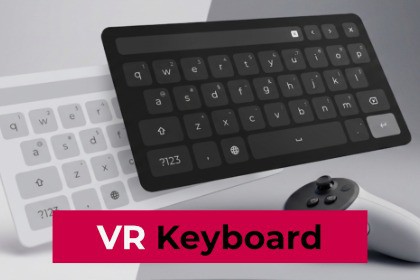
A complete, extensible VR Keyboard for Unity. Handle text input in XR with full controller & hand tracking support, multiple layouts, and customizable themes. Tested on Quest 2, 3, 3S and Valve Index.VR Spatial Keyboard is a complete, extensible text input solution built for VR and MR projects in Unity. Designed for XR developers, it combines intuitive interaction, flexible layout support, and deep customization to handle keyboard input seamlessly in immersive environments.📢 Access our Discor Server for questions, news, updates!─────────────────────────────────────☑️ XR & UI IntegrationFully integrated with Unity UI Toolkit and XR Interaction Toolkit. Supports both controller interaction and hand tracking, including pinch and poke gestures, for accessible text input in VR.☑️ Broad Input Field SupportWorks with UI Toolkit input fields (TextField, IntegerField, FloatField,...) as well as uGUI TMP_InputField (TextMeshPro). Bind the keyboard to any input field with minimal setup.☑️ Multiple Keyboard LayoutsShips with Default, Number, and Phone layouts, plus Email, URL, and Search variations. The layout adapts automatically based on the input field's keyboard type. Create fully custom layouts to match any use case.☑️ Text Preview & EditingAn integrated input preview row lets users review their input, place the cursor, select and clear text.☑️ Smart Key FunctionsFunctional keys include Shift, Backspace, Clear, move cursor position and Language Selection. Long-press keys reveal alternate symbols and characters. Text can be pre-selected when focusing an input field for fast editing.☑️ Flexible PositioningMove the keyboard by grabbing its handle. Billboard mode automatically aligns it to face the user. Flatten mode simulates a desk surface - perfect for seated or productivity-oriented experiences.☑️ Customizable ThemesShips with Modern Light and Dark themes. Fully customize the look using TSS and USS style sheets, or create your own theme from scratch without modifying core assets.☑️ LocalizationIncludes English (QWERTY) and German (QWERTZ) layouts out of the box. Add layouts for additional languages to match your audience.☑️CompatibilityThe VR Spatial Keyboard is compatible with the Immerea VR File Browser !🎮 Supported PlatformsMeta Quest 2, 3, 3S: Standalone (APK), Windows (PC VR), Meta Horizon Link, SteamVRValve Index: Windows (PC VR), SteamVRRequires: XR Interaction Toolkit 3.2.2+, Unity 6.2+─────────────────────────────────────⚠ ImportantAs of XR Interaction Toolkit v3.5, VR interactions in the Unity Editor require the Game View to have active focus. Click anywhere inside the Game View window before interacting in VR.─────────────────────────────────────📄 Documentation: https://packages.immerea.com/vr-keyboard/documentation/✉ Support: support@immerea.comUnity Version: 6.2, 6.3 (newer versions may be compatible)Render Pipeline: Compatible with URP and HDRPDependencies: com.unity.xr.interaction.toolkit ≥ 3.2.2, com.unity.xr.openxrSupported Platforms: Android (Meta Quest 2/3/3S), WindowsPC VR Runtimes: Meta Horizon Link, SteamVRUI System: Unity UI Toolkit (USS/TSS)Input: XR Interaction Toolkit controller & hand tracking (pinch & poke)Input Field Support: UI Toolkit (TextField, IntegerField, FloatField,...), uGUI TMP_InputFieldKeyboard Layouts: Default (+ Email, URL, Search), Number, PhoneTheming: Modern Light, Modern Dark, Base theme for custom themesPositioning: Grabbable handle, Billboard mode, Flatten modeKey Functions: Shift, Backspace, Clear, Language Selection, Long-press alternatesLocalization: English (QWERTY), German (QWERTZ), extensible for additional languagesExtensible: Custom layouts via KeyboardCollection, custom themes via TSS/USSDocumentation: Full online documentation includedImportant: for XR Interaction Toolkit + UI Toolkit as of XR Interaction Toolkit v3.5, VR interactions in the Unity Editor require the Game View to have active focus─────────────────────────────────────☑️ Compatible with the Immerea VR File Browser !

