






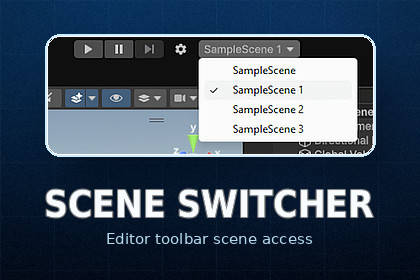
Streamline your workflow with SceneSwitcher: instant toolbar access to scenes, custom favorite lists, and a global Play Mode startup scene with automatic return to your previous work.Recommended places asset only in the Editor folder.Recommended places asset only in the Editor folder.SceneSwitcher is a powerful productivity tool for Unity designed to eliminate the friction of navigating between multiple scenes. It integrates seamlessly into the Unity Main Toolbar, putting your project'sscenes just one click away.Whether you're working on a massive multi-scene project or a small indie game, SceneSwitcher keeps your focus on development rather than folder navigation.Key Features:* Main Toolbar Integration: Quick-access dropdown menu and settings button located right next to the Play/Pause controls.* Dual Scene Modes:* Build Settings Mode: Automatically lists all enabled scenes from your project's Build Settings.* Custom List Mode: Create your own curated list of "Favorite" scenes by simply dragging and dropping scene assets into the settings window.* Global Play Mode Startup Scene: Specify a "Bootstrap" or "Main Menu" scene that will always load when you press Play, ensuring your game initialization logic always runs correctly.* Smart Scene Restoration: When using the Startup Scene feature, SceneSwitcher remembers your current working scene and automatically reloads it once you exit Play Mode.* Modern UI & Compatibility: Fully supports the new customizable toolbar in Unity 6, while maintaining smooth integration with older versions (2021.3+).How it improves your workflow:* Eliminate Search Time: No more digging through deep folder structures in the Project window.* Consistent Testing: Ensure the game always starts from the correct entry point (e.g., initialization scene) without manual switching.* Seamless Switching: Jump between levels or test cases instantly.---3. Technical details* Unity Compatibility: Supports Unity 2021.3 LTS, 2022.3 LTS, and Unity 6 (6000.x).* Native UI: Utilizes Unity's official Overlay and Toolbar APIs for a clean, built-in look and feel.* Performance: Ultra-lightweight editor-only extension with zero impact on your game's runtime performance.* Non-Intrusive: Doesn't modify your scenes or project structure; settings are stored in a single ScriptableObject.* Auto-Sync: Dropdown list automatically refreshes when Build Settings or scene files change.* Easy Setup: Works out of the box with no coding required.AI-assisted tools were used to create and/or enhance some marketing visuals for this package, including background composition, visual presentation, image polishing and create documentation. The package functionality, Unity Editor tool logic, documentation, and final submitted content were reviewed and edited manually by the publisher.

