






PanzaScope - Project Audit & Architecture Map
Panzadabira
$10.99
$46.20
76%OFF
(no ratings)
Jump AssetStore
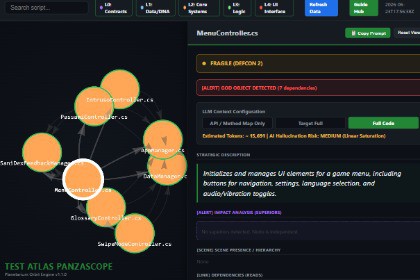
Audit your Unity project: find unused scripts, event leaks, dependency cycles and rename risks hidden in scenes and prefabs, and explore your architecture on an interactive map.PanzaScope is an Editor-only utility. It does not rely on any materials, shaders, or specific rendering features.Know what is in your project before you change it.PanzaScope scans your C# scripts, scenes and prefabs and tells you what your compiler and your search box cannot: which scripts nothing uses, what a rename would silently break in your scenes and prefabs, which event subscriptions are never undone, where types depend on each other in circles, and which methods are expensive or too complex. The result is one readable audit report and an interactive node map of your architecture. It is an Editor-only tool: nothing is added to your build.Want to try the original engine first?Check out the open-source Python engine on GitHub:https://github.com/Panzadabira/PanzaScopeWhy the Asset Store version?It is the same idea rebuilt as a native Unity extension: no Python, no command line, an Editor menu, a visual map, an Unused Scripts window and a ready-to-read audit report that you generate with one click.Key featuresAudit report [NEW]: one readable file (audit.md) with unused scripts, event subscriptions never cleanly undone, dependency cycles, hotspot methods, god objects and hubs, a rename reference and class-name mismatches. Your own code is listed first; third-party folders are marked and listed after it.Unused Scripts window [NEW]: reachability analysis from scenes, prefabs, assets, Unity attributes and editor code, with a confidence level per file. Review, ping, and move the safe ones to the system Trash (re-validated at the moment of deletion). Unused scripts also appear on the map as ghost nodes, with an Unused filter.Rename risk [NEW]: the serialized fields that have data saved in scenes and prefabs (variants and overrides included), with the stored value, and the members called by name (UnityEvent, Animation Events, SendMessage, Invoke, reflection). Rename one without [FormerlySerializedAs] and the value is silently reset: PanzaScope tells you beforehand.Event analysis [NEW]: what each type subscribes to and whether it unsubscribes. Never-removed subscriptions and lambdas are listed first; button callbacks held by a controller are kept apart as lowest priority.Performance hotspot scanner: flags per-frame callbacks that hide a cost (continuous GetComponent, Find, allocations, LINQ) and the most complex methods, with line numbers.DEFCON score: grades each script Stable, Fragile or Critical from its coupling, scene over-instantiation and technical debt.Predictive impact analysis: see exactly which scripts depend on a script before you change one of its public methods.God object detection: highlights tightly coupled scripts (7+ dependencies) with glowing borders.5-layer semantic mapping: scripts are grouped by role: contracts, data, systems, gameplay logic, UI.Scene tracking: shows which GameObjects in which scenes and prefabs host each script, and flags scripts that are heavily instantiated.Technical debt radar: collects every // TODO, // FIXME and // HACK in one panel.Freshness tracker: fades scripts left untouched for more than 90 days, so legacy areas stand out.Works for people and for AI assistantsAll reports are plain, versioned JSON and Markdown files, so any script or AI coding assistant can read them. The analysis is static and matches by name: use it as an audit you consult before a rename, a refactor or a clean-up, and always verify a finding in the source.AI context exporter: one click merges a script with its architectural context into a ready-to-paste prompt.Two export modes: full code, or API / method map only (Eco-Scan), which strips method bodies and keeps class structure, fields and signatures (about 83% fewer characters on the bundled demo).Optional AI summaries: generate short summaries inside the map withPrivate local AI: run offline and free with Ollama (for example Qwen2.5-Coder). Your code stays on your machine.Cloud AI: commercial APIs (ChatGPT, Claude, Gemini, Groq). Note: your own API key is required; not included.The audit report, the unused-script analysis and the map do not use AI and do not need an API key.Architecture: 100% native C# Unity Editor extension, no Python or other runtime. Editor-only: nothing is added to your build.Reports: audit.md, unused_scripts.md and a versioned machine-readable export (agent/index.json plus one JSON file per type) written to Library/PanzaScope/, outside Assets/, so they are never imported or committed.Analysis: static, by name, over comment-free code. Reads scenes, prefabs (variants and overrides), ScriptableObject assets and animation clips serialized as text (Force Text) for serialized values, persistent UnityEvent calls and Animation Events. Calls made by string or reflection are listed separately.Interactive map: generates a local HTML/JS file using the vis-network library for physics-based graph rendering. The graph library is loaded from a CDN, so the map page needs an internet connection; the reports do not.AI integration (local): optional offline support for local models through the Ollama API (for example Qwen2.5-Coder): no data leaves your machine.AI integration (cloud): optional REST support for Groq, Google Gemini, Anthropic Claude and OpenAI. Requires your own API key.Sanitization: double-pass encoding of C# generics (for example List) and quotes keeps the generated page free of script errors.Localization: interface and AI prompts in English, Italian, French, German, Spanish, Chinese, Russian and Japanese.Compatibility: Unity 2022.3 LTS or newer (developed and tested on Unity 6000.3). Scans .cs, .uxml and .uss files plus text-serialized scenes, prefabs and assets. Works with any render pipeline (Built-in, URP, HDRP).Dependency: Newtonsoft Json (com.unity.nuget.newtonsoft-json); PanzaScope offers to install it if it is missing.Includes: a small demo project and EditMode NUnit tests.1. AI functionality inside the tool. All graph mapping, dependency tracking, layer categorization, unused-script detection, rename-risk, event and complexity analysis and the audit report are produced by deterministic C# code; no AI model is involved and no network access is needed. The package also includes an optional AI summarization bridge (PanzaScopeAIAnalyzer.cs). Only if the user enables it and provides their own API key, or points it to a local Ollama model, it sends a script to the chosen model to generate a short technical summary shown in the documentation sidebar.2. AI assistance during development. AI coding assistants (Claude Code) were used to help implement, refactor and test large parts of the Editor code (parsers, analyses, report generation and the unit tests) and to draft, translate and refine the documentation and Asset Store copy. The developer defined the requirements and made the architectural decisions, reviewed the results and tested the tool in the Unity Editor.

