






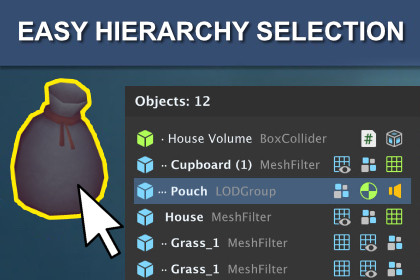
Easy Hierarchy Selection is a high-performance tool for the Unity Editor designed to instantly search for and select objects in scenes.We’ve all encountered the problem of accidental clicks when selecting an object on the scene. Or when you have to click several times in the same spot to select the right UI element.This extension solves this problem in both 2D and 3D projects.Hold Alt + Shift and click anywhere in the Scene window to open a pop-up menu with a list of all objects at that point. Hover to highlight an object and click to select it.In the pop-up menu, you’ll see a list of objects sorted by collision distance (if they have a collider). Or by distance from the camera, if it’s not a physical object.✨ FeaturesZero GC Allocations - the plugin does not generate memory garbage during operation, which is critical for the editor’s stability in large projects.Scene View Performance - no unnecessary repaint calls.Smart Sorting - objects are sorted based on collision distance.Informative UI - display of type icons and nesting level for quick navigation.Layer filtering, Terrain/Canvas ignoring.Visual feedback customization.3D, 2D & UI support - works with any colliders, sprites, and UI elements.LOD groups support - a group is selected instead of a specific object.Flexible Search - adjust cast distance and layer masks (LayerMask).Visual Feedback - highlight object bounds when hovering and automatic "ping" in the hierarchy.No additional setup is required before use.No external dependencies.🛠️ ConfigurableChoose your modifier keys (Shift, Control, Alt, Command).Exclude specific layers.Optional `Ping` or `Focus on select` to frame objects.Search distance.Number of items to search.The color of the object's highlighting.Optional ignore Terrain and Canvas.Show or hide object components icons.Version SupportUnity 2022.3 LTS or later (Including Unity 6).Works with all render pipelines (Built-in, URP, HDRP).Editor-Only Tool – Does not affect runtime builds.Platforms: All (Windows, macOS, Linux) - editor functionality only.Dependencies: No external packages required.InstallationImport the package.Open Edit -> Project Settings -> Easy Hierarchy Selection to change settings.Alt + Shift + Click (configurable) an object to see the selection pane.If you have any concerns, please feel free to email.

