






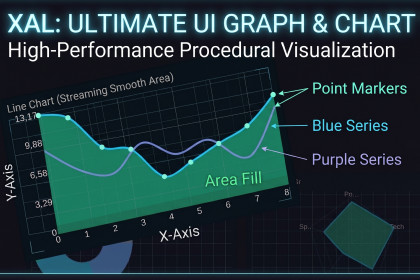
Pro procedural UI Charts for Unity. No sprites, zero-lag, anti-aliased graphics. Line, Bar, Pie, Radar with smooth animations & Sci-Fi shaders. The ultimate performance-first data visualization tool.This asset uses TextMesh Pro for text rendering. Please make sure to import TextMesh Pro into your project before useTo see what's possible, please check the documentation!Documentation LinkXAL Charts: High-Performance Procedural UI Data VisualizationStop relying on heavy sprites and blurry UI elements. XAL Charts is a professional-grade, procedural graphing tool built from the ground up using Unity’s VertexHelper and CanvasRenderer. It calculates mesh geometry point-by-point to deliver pixel-perfect, anti-aliased visuals with lightning-fast performance.Whether you are building a complex strategy game, a sci-fi HUD, or a data-heavy application, XAL Charts provides the flexibility of a Fluent API combined with stunning visual effects.🚀 Key Features100% Procedural: No sprites required. Every line, bar, and slice is drawn via code, ensuring zero memory overhead from textures.Radar/Spider: Multi-axis visualization with adjustable grid levels.Multi-Chart Support:Line & Area: Smooth Bezier curves or straight lines with customizable point markers.Bar & Column: Dynamic scaling for easy comparison.Pie & Donut: Interactive "Explode" effects and auto-randomized color palettes.Fluent API: Create complex charts in a single line of code with our chainable command system.Ultra-Smooth Animations: Built-in AnimationCurve support for data transitions and entry effects.Advanced Anti-Aliasing: Custom feathering algorithms ensure smooth edges at any resolution.Interactive UI: Integrated Tooltip system and Event-driven architecture (OnClick, OnHover).Sci-Fi & Neon Effects: Includes a specialized Glitch/Hologram shader for cyberpunk aesthetics.TextMeshPro Integration: Sharp, customizable labels and value formatting (Currency, Decimals).🛠 Technical ExcellencePerformance First: Optimized for mobile and desktop. No CPU-heavy calculations during runtime updates.Auto-Scaling: Intelligent Y-axis management based on your data range.Editor Friendly: Test your charts directly in the Inspector with live preview data.Technical Details:UI System: UGUI (Unity UI)Rendering: 100% Procedural Mesh Generation (Uses CanvasRenderer & VertexHelper)Dependencies: TextMeshPro (TMP)Textures/Sprites: None required (Zero texture memory footprint)Platform Compatibility: All platforms supported by Unity UI (PC, Mobile, Console, WebGL, VR/AR)Code Architecture: Object-Oriented, fluent API structure, fully documented.Key Features:100% Procedural Rendering: Draws crisp, dynamic charts without using any sprites or external textures. Extremely lightweight and performant.4 Core Chart Types: Line Chart (Smooth/Cubic Bezier or Straight), Bar Chart, Pie/Donut Chart, and Radar/Spider Chart.Built-in Anti-Aliasing: Features a custom mesh feathering technique ensuring smooth, jagged-free edges on all chart lines and circles, regardless of resolution.Dynamic Animation System: Values don't just pop in; they smoothly animate using customizable AnimationCurve interpolations on startup and on data updates.Fluent API: Create and populate complex charts via code using a highly readable, chained syntax (e.g., Chart.NewLine().AddData(10).SetColor(Color.red)).Interactive Event System: Native support for Mouse/Touch interactions. Includes built-in OnHover and OnClick UnityEvents passing detailed ChartHitInfo (series, value, coordinates).Dynamic Tooltips: Ready-to-use, responsive tooltip system that follows the cursor and displays precise data point values.TextMeshPro Integration: Crisp, scalable axis labels, values, and legends powered by TMP. Supports automatic axis scaling, step generation, and custom value formatting (e.g., Currency).Multi-Series Support: Layer and compare multiple data series seamlessly on a single chart.Responsive Layout: Fully integrated with Unity's RectTransform system. Charts dynamically rebuild and scale flawlessly when UI boundaries change.Bonus Visual Effects: Includes a custom "Sci-Fi Glitch" shader and "Neon Frame" component for futuristic UI designs.Editor Preview: See the charts directly in the Unity Editor using customizable mock data before entering Play mode.

