






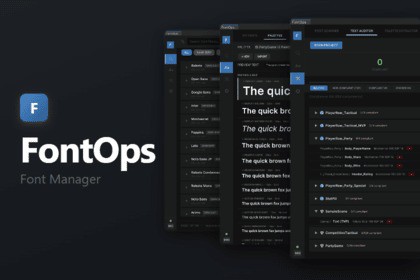
The fastest way to manage fonts in Unity. Browse 2,000+ fonts, enforce consistency with palette roles, pick fonts right inside the inspector, and audit your whole project — all from one editor window.🔤 FontOps is the fastest way to manage fonts, enforce typography, and keep every text component in your project consistent. Stop hunting through folders, browser tabs, and ZIP archives. FontOps gives you one editor window to browse fonts from multiple foundries, build a type system, and audit your entire project.⚡ Extremely easy to use. Open Tools → FontOps and everything is right there — search fonts, build palettes, scan your project, and assign fonts straight from the TextMeshPro inspector. No setup, no configuration files, no code required.👉 Documentation: docs.davgtz.dev/fontops📦 This asset contains:🔍 Multi-Provider Font Browser — Search, preview, and install fonts from Google Fonts, Fontshare, and Fontsource without leaving Unity. Filter by category, sort by popularity or trending, and see the exact license on every card. One click installs the font and auto-generates a TMP font asset with configurable atlas size and SDF mode. The same family from multiple sources is automatically deduplicated.🛡️ Commercial-safe by default — Only OFL, Apache, MIT, and UFL fonts are ever surfaced, with the license shown on every card. Ship your project without licensing surprises.🎨 Font Palette System — Define your typographic rules with named roles (Header, Body, Caption, Button, or any custom role). Each role stores font, size, style, and color. Palettes are ScriptableObjects — share across projects, with your team, or export/import as JSON. Autosave with dirty tracking and snapshot restore.🎯 Inline Font Picker — A FontOps button on every TextMeshPro / TextMeshProUGUI inspector opens a searchable dropdown with three sections — your palette roles, every installed font, and not-yet-installed catalog families — each entry typeset in its own typeface. Assign in one click (uninstalled fonts install on the spot), with full Undo support for scene objects and prefabs, multi-selection included. No more object-picker roulette.📋 Text Auditor — One-click scan of every scene and prefab. See which text components follow your palette and which don't. Filter by Compliant, Non-Compliant, or Ignored, mark intentional exceptions with the ignore system, and jump straight to any component in the Inspector to fix it. Full prefab instance detection with override tracking. Run it without a palette for a project-wide usage & quality report.🧠 Palette Extractor — Generate an AI-ready prompt that analyzes your existing text components and recommends palette roles. Import the results back as JSON with one click. Perfect for bootstrapping a palette from an existing project.📁 Font Scanner & Organizer — Find every font in your project (.ttf, .otf, TMP assets). Classify by source, detect duplicate font families across folders with MD5 hash verification, and organize scattered fonts into a clean folder structure. Generate TMP assets from any legacy font on the spot.🎮 Two samples included — FontOps Playground (guided first-time experience) and Scoreboard Demos (tactical vs party) — to get you started immediately.⚠️ Important: Requires Unity 2022.3 LTS or higher TextMeshPro and Newtonsoft JSON are resolved automatically Works with any render pipeline (Built-in, URP, HDRP) Editor-only tool — no runtime overheadMulti-provider font browser: Google Fonts, Fontshare, and Fontsource, with search, filters, and one-click installCross-source deduplication with multi-source badgesCommercial-safe filtering — only OFL, Apache, MIT, and UFL licenses surfaced; license shown per fontTMP font asset auto-generation with configurable atlas size and SDF modeInline Font Picker on every TMP_Text / TMP_TextUGUI inspector (Undo + prefab + multi-select aware)Typographic palette system with named roles (ScriptableObjects)Palette JSON import/exportText auditor: scan all scenes and prefabs for compliance, with palette-less usage reportAuditor ignore system for intentional exceptionsAI-ready palette extractor with JSON importFont scanner: source classification, duplicate detection (MD5), folder organizerResponsive layout with compact modeUnity 2022.3 LTS+Requires TextMeshPro and Newtonsoft JSON (auto-resolved)Supported OS: Windows, macOS, LinuxDocumentation: https://docs.davgtz.dev/fontopsAll features and ideas were designed by the developer. AI was used as a development assistant throughout the project for code generation, architecture implementation, and documentation writing. All output was reviewed and tested by the developer.

