






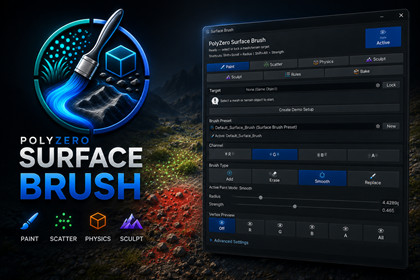
Surface Brush Studio — Paint, Scatter & Physics Placement
Polyzero
$15.39
$21.99
30%OFF
(no ratings)
Jump AssetStore
Paint, scatter, sculpt, simulate and bake objects on meshes and terrain-like surfaces with a clean artist-friendly workflow.Surface Brush Studio is an editor tool designed to speed up environment creation inside Unity.It gives artists and level designers a direct brush-based workflow for painting vertex channels, scattering prefabs, dropping objects with live physics, sculpting mesh surfaces, applying placement rules and baking clean results.Instead of manually placing grass, rocks, debris, props or terrain details one by one, Surface Brush Studio lets you work directly in the Scene View with intuitive brush controls, presets, target locking and cleanup tools.Use it for environment dressing, terrain detail passes, debris placement, survival scenes, forest floors, rocky areas, camping props, rubble fields, path dressing and fast level art iteration.Use CasesSurface Brush Studio is useful for:Environment art dressingTerrain detail passesForest floorsGrass and vegetation placementRocks and debris scatteringAbandoned/camping scenesSurvival environmentsRubble fieldsRoadside propsNatural object placementVertex blend mask paintingFast level art iterationScene cleanup and bakingKey FeaturesVertex PaintPaint directly on mesh vertex colors using RGBA channels.R / G / B / A channel paintingAdd, Erase, Smooth and Replace modesFace and vertex preview in Scene ViewFill, Clear and Smooth All toolsAdjustable radius, strength and falloffShift shortcut for temporary eraseFast brush workflow directly in Scene ViewScatter PlacementScatter prefabs across a selected surface using brush strokes.Multiple prefab supportPer-prefab influence controlPer-prefab scale rangeScatter presets such as Grass, Debris, Rocks, Forest, Camping and RubbleRandom yawDensity multiplierAlign to surfaceScene object counterAuto parent organizationPaint, Erase and Replace scatter modesCollision-Aware ScatterAvoid unwanted overlapping while scattering objects.Avoid collisions toggleUse prefab boundsCheck existing scatter objectsCheck scene collidersCollision radius controlCollision layer maskMax placement attemptsLive Physics PlacementPlace objects using temporary physics and bake the settled result.Drop, Roll, Pile, Throw and Scatter Drop modesFast, Stable and Precise quality modesLive physics object trackingMoving and settled object countersRandom forceRandom torqueMass rangeDrop height controlFix intersectionsBake settled objectsOptional collider keepingRemove temporary rigidbodiesMove baked results to a clean parentMesh SculptShape editable mesh surfaces directly in the editor.Raise brushLower brushSmooth brushFlatten brushSmooth AllFlatten AllReset SculptRadius and strength controlsShortcut support for fast adjustmentsBake & CleanupFinalize your edited scene with cleanup tools.Create backupSave meshBake physicsValidateFix issuesClean baked componentsReset paintReset sculptReset paint + sculptCompatible with:Built-in Render PipelineURPHDRPCompatible with Built-in Render Pipeline, URP and HDRP.Surface Brush Studio is an Editor tool for Unity. It includes vertex painting, prefab scattering, collision-aware placement, live physics placement, mesh sculpting, placement rules, bake/cleanup tools, presets and Scene View controls.Generated objects are standard Unity GameObjects and remain editable in the scene.No external packages required.Tool location:Tools > Polyzero > Surface BrushMain features:- RGBA vertex paint- Prefab scatter with presets- Collision-aware scatter- Live physics placement and baking- Mesh sculpt tools- Slope and height placement rules- Bake, validate and cleanup utilitiesLimitations:Vertex color preview depends on materials/shaders that support vertex colors. Physics placement depends on prefab colliders and scene collision setup.Used AI to find code bugs

