






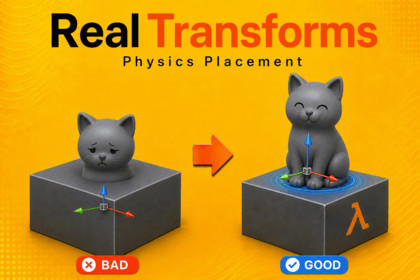
Build grounded scenes faster with physics-assisted placement for Unity. Drop, rotate, spread, and arrange props naturally without floating, clipping, or endless hand-tweaking.⚡ RealTransforms - Physics Placement That Feels Native To UnityStop nudging props by hand. Stop guessing whether something is floating, clipping, or barely touching the floor. RealTransforms brings physics-assisted Move, Rotate, Drop, and Arrange tools directly into the Unity Scene view, using familiar hotkeys and editor controls so placement feels fast, natural, and immediate.Select your props. Toggle Physics Assist. Keep building.🧲 Physics-Assisted PlacementMove objects through your scene while editor physics helps them collide, slide, stop, and settle against real surfaces. Ideal for set dressing, environment art, props, clutter, rocks, furniture, shelves, pickups, debris, and graybox layouts.⬇️ Drop Objects NaturallyUse the primary action key to drop selected objects onto floors, tables, ramps, platforms, shelves, and other scene geometry. Instead of lining everything up by hand, let gravity do the work.🔄 Rotate With Contact AwarenessRotate props while physics helps keep them grounded and reduces obvious intersections. Quickly level objects, turn assets into place, and make scene dressing feel physical instead of manually staged.📦 Arrange Groups FastSelect multiple objects and use physics-aware Arrange tools to clump, spread, space, level, or randomize rotation. Build believable clutter, shelves, piles, and prop layouts in seconds.⌨️ Intuitive Hotkey WorkflowRealTransforms is built around seamless editor flow. CapsLock toggles Physics Assist by default, W/E/R map naturally to Move, Rotate, and Arrange, and Space handles the primary action. Every key can be reassigned, so the tool fits your workflow.✨ Works With Existing ScenesUse your existing colliders, or let RealTransforms create temporary editor-only proxy colliders for render-only meshes. Your environment art can participate in placement without adding unwanted runtime clutter to your final game.🧱 Real Hulls Collider CreationRealTransforms includes Real Hulls, a built-in convex collider creation system designed to help generate compound colliders for difficult meshes. This is useful for crates, props, shelves, hollow shapes, and other objects where a single convex collider is not enough.⚠️⚠️⚠️Real Hulls is currently in beta. It is already useful for many meshes, but collider generation is an area that will continue improving over time. If you find a mesh that Real Hulls does not represent accurately, reports are welcome and will help guide future updates.CoACD and V-HACD have been removed from the package due to licensing conflicts.⚠️⚠️⚠️🚀 Built For Speed And ControlChoose performance presets, control physics steps, tune scene proxy behavior, adjust hull counts, and balance accuracy against editor responsiveness. Use the defaults when you want speed, or go deeper when a scene needs precision.RealTransforms is for developers and artists who want Unity scene building to feel physical, intuitive, and integrated. It keeps the workflow familiar, adds physics where it matters, and helps scenes feel placed, grounded, and finished without wasting hours fighting transforms.Future UpdatesRealTransforms will continue to grow with new features, refinements, and improvements to Real Hulls. As the asset expands, the price may increase over time. Anyone who already owns RealTransforms will receive future updates at no extra cost.NoteScenes shown in promotional videos and images are for demonstration only and are not included.RealTransforms uses Unity’s built-in PhysX simulation for editor placement. For the best experience, use a desktop-class machine. Low-end hardware, ARM-based systems, and some macOS setups may have reduced editor performance, especially in dense scenes or when using generated colliders, Scene Proxies, or high-accuracy physics settings.Documentation:https://drive.google.com/file/d/1wnOvHvRHe65Aw2TlQB_meX-tz-9Xcfui/view?usp=sharingFor the fastest support, join the Discord:https://discord.gg/7SUBZPfN8a80 Level Article:https://80.lv/articles/unity-tool-for-prop-placement-with-physics-simulationFeel free to reach out if you run into any issues!.Core FeaturesPhysics-assisted Move, Rotate, Arrange, and Drop tools.Seamless Scene view workflow built around familiar Unity-style hotkeys.Toggle Physics Assist instantly and keep working inside the editor.Drop selected objects with gravity for fast, natural placement.Contact-aware movement and rotation to reduce floating, clipping, and obvious intersections.Arrange tools for clumping, spreading, spacing, leveling, and random rotation.Temporary editor-only physics bodies for selected objects.Optional Scene Proxies for render-only meshes and objects without colliders.Local proxy cache and scene radius controls for large scenes.Built-in collider baking for complex props.Real Hulls compound collider generation, currently in beta and actively improving.Smart Hulls for faster lightweight collider creation.Performance presets for fast, balanced, or high-accuracy placement.Tunable collision layers, trigger handling, ignored tags, clearance, contact settings, physics steps, and solver settings.Optional collision indicators and baked collider gizmos.Object baking tools for combining selected rendered meshes into reusable optimized assets.Reassignable keys for Physics Assist, Move, Rotate, Arrange, and Primary Action.Undo-supported editor workflow.Example scene included.No runtime placement system required in your final game.🎯 Best ForLevel designEnvironment artSet dressingProp placementClutter passesGrayboxingPhysics-assisted layoutShelves, floors, ramps, tables, rocks, debris, pickups, furniture, and scene dressingComplex props that need better collider setupArtists and developers who want placement tools that feel native to Unity⚙️ CompatibilityBuilt for Unity 6 and above.Works with Built-in Render Pipeline, URP, and HDRP projects.Uses Unity 3D Physics / PhysX.Editor-only placement workflow.Generated baked colliders and baked objects can be used normally in your scene.No runtime placement system is required.AI code assistance used to help debug and develop tool

