






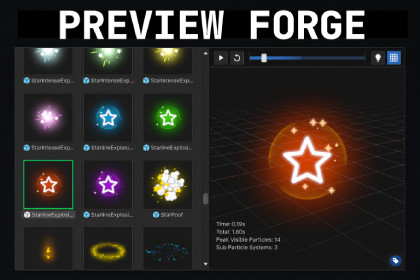
Draws particle and ui prefab thumbnails in project window and adds a richer inspector previews for prefabs, particles, and model assetsA completely free version with the exact same feature set is available on my GitHub. 🆓This editor extension generates custom thumbnails for ui and particle prefabs and adds a custom preview to the Inspector, so you can quickly see the effect without dragging it into the scene.It also enhances previews for 3D and 2D prefabs, as well as model assets, with a grid, improved lighting, camera controls, and useful view modes like Normal, UV, Vertex Color, and more.FeaturesCustom thumbnails for particle prefabs in the Project windowCustom thumbnails for supported UI prefabsCustom Inspector previews for particle prefabsPlayback controls with timeline scrubbing for particle previewsMotion-aware framing for moving particle effectsEnhanced preview support for 2D, 3D, prefab, and model assets including .fbx and .blendOrbit, pan, zoom, and auto-framing controlsOptional preview grid, bounds, and collider overlaysImproved preview lighting with configurable light rig and skybox supportVisual modes including Normal, UV Checker, Vertex Color, Matcap, and OverdrawOn-preview stats including renderer count, triangle count, material count, and bounds sizeCached thumbnails for better editor responsivenessOptional prefab type badges for faster Project window browsingImproved preview fallback and compatibility handling for more reliable editor behaviorUnity 2022.3+ support, including Unity 6.5 compatibility improvementsNotesA Unity Editor restart may be required after first install or import so preview hooks initialize cleanly.If you run into issues while updating from an older version, fully remove the existing Assets/Noodle Hammer/Preview Forge folder before importing the new version.UI prefab support currently applies to custom thumbnails only.VFX Graph thumbnails are not currently supported.In URP, particle shaders that depend on the camera opaque texture may render pink in thumbnails or prefab previews. This is a limitation of the current preview rendering path.AI was used in multiple steps of developing this package that includes planning, optimizing and preparing the package for production use.

