






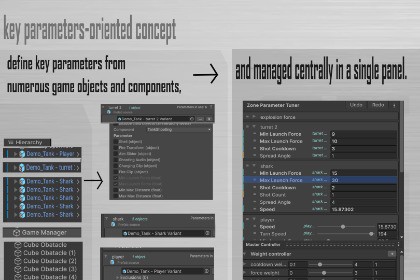
Tune gameplay parameters across multiple objects from one editor panel, test in Play Mode, and apply reviewed changes back to scenes or prefabs with presets.Zone Parameter Tuner is a Unity Editor tool for fast gameplay balancing.Instead of jumping between many GameObjects and components, you can collect key serialized fields into one panel, tune them in batch, and iterate quickly in Edit Mode or Play Mode.What it doesCentralizes parameters from multiple objects in one placeSupports one-to-many tuning for shared fieldsWorks with scene object lists and prefab source listsLets you preview and selectively apply Play Mode changesCan apply tuned values back to prefab defaultsIncludes scene presets and master preset workflowWhy it helpsFaster balancing loopsFewer Inspector context switchesBetter control over what gets applied and persistedUnity version: 2022.3 LTS or newer (tested on Unity 6 / 6000.x)Package type: Editor extensionRuntime dependencies: None (Unity only)Third-party dependencies: NoneCore data model: Scene-bound tuner state + optional preset assetsPlay Mode workflow: Change tracking with confirmation dialog before applyPrefab workflow: Optional apply-to-prefab-defaults for prefab-source entriesSource list types: Scene Object Source, Prefab SourceIdentity requirement (prefab source): ZoneParameterTunerIdentity on prefab rootCompatibility approach: Reflection-based field resolution (no hard dependency on Unity internal editor APIs)Supported targets: Unity-serializable leaf propertiesLimitations: Some actions (for example Inspector right-click quick add) are Edit Mode onlytech support

