






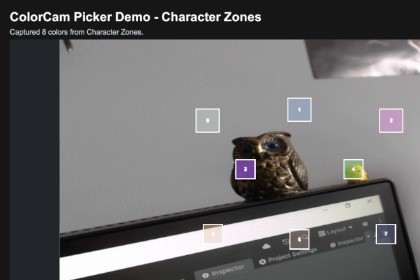
ColorCam Picker lets Unity projects capture and sample real-world colors from a webcam or device camera using customizable calibration points.ColorCam Picker is a Unity runtime package for sampling real-world colors from a webcam or device camera using customizable calibration points.The package includes a reusable camera color-picking workflow, configurable color profiles, runtime sample nodes, color processing settings, calibration helpers, and a complete demo scene. Users can define where colors should be sampled in the camera frame, adjust node size and position, tune brightness/saturation processing, and save calibrated layouts for later use.ColorCam Picker is suitable for creative tools, educational apps, customization systems, coloring games, AR-style interactions, character/outfit color matching, physical color card detection, and any Unity project that needs to read colors from the real world.Included content is fully customizable: - Create your own color sampling profiles. - Add, move, resize, and calibrate sample nodes. - Adjust color processing settings. - Replace or restyle the UI. - Use the included demo scene as a starting point or integrate the runtime API into your own workflow. Technical Details - Runtime webcam/device camera color sampling with WebCamTexture. - Configurable ColorCamPickerProfile ScriptableObjects. - Custom sample nodes with normalized position and size. - Multi-point color capture from a single camera frame. - Resolution-independent coordinate system. - Color processing controls for brightness, saturation, value, and saturated-pixel selection. - Runtime calibration helpers for draggable UI sample nodes. - Save/load support for calibrated node positions through PlayerPrefs. - Optional ColorCamPicker MonoBehaviour facade for quick setup. - Low-level ColorCamCameraSession API for custom camera workflows. - ColorCamPickerProcessor for sampling colors directly from Texture2D. - Aspect ratio helper for aligning camera preview UI. - Demo scene with four example sampling profiles. - Demo UI visible in Edit Mode before pressing Play. - Editor menu tools to open the demo scene and rebuild demo UI.

