






Picture Block Puzzle 2D | Game Template + Level Editor
Ragendom
$27.49
$54.99
50%OFF
(no ratings)
Jump AssetStore
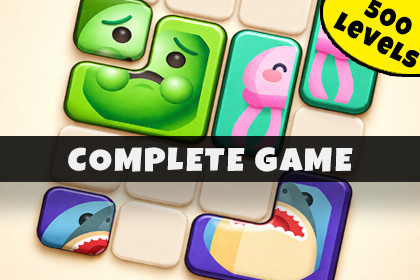
Picture Block Puzzle 2D is a professional Unity game template for building sliding picture-assembly puzzles. This asset provides a complete hyper-casual gameplay + level editor and level generatorPicture Block Puzzle 2D is a complete Unity game template for building and customizing sliding picture-assembly puzzle games. Developed with the HyperCasual Game Engine, this asset provides the core systems, architecture, and tools needed to create a unique mobile-ready puzzle experience.Players drag color-coded image pieces across a 2D grid to reconstruct original pictures before the timer runs out. With physics-based sliding, multi-cell shape footprints, and satisfying assembly mechanics, this template offers a polished hyper-casual gameplay loop inspired by popular mobile assembly puzzles.This game template includes a full puzzle gameplay loop, a time-pressure countdown system, three boosters, and a fully featured Unity level editor with automatic level generation. Every system is modular, data-driven, and designed as a foundation for rapid extension and production-ready development.Try First: Browser Demo | Android DemoOUR ADVANTAGES· Developer-oriented architecture with a focus on clean, extendable code.· Clear documentation and a guided setup wizard workflow.· Built-in level editor and automatic batch generation utilities.· Easy visual, color, and gameplay customization via URP and JSON-driven data.· Clean, modular codebase with namespace isolation (PictureBlockPuzzle2D.Scripts).TEMPLATE INCLUDES🖼️ Picture-Assembly Gameplay· Slide-to-Assemble Mechanic: Drag-and-drop pieces on a 2D grid with physics colliders to prevent overlap.· Multi-Cell Shape Footprints: Support for complex block shapes that occupy multiple grid cells.· Zero-Piece Anchor System: Solved states are computed relative to a designated anchor piece for precise assembly.· Picture Merge Effect: Pieces fade into the final image with star particle bursts upon successful completion.· Time-Pressure Countdown: Customizable per-level time limits that trigger lose conditions at zero.· Obstacle System: Static wall cells that blocks cannot enter, adding strategic depth.🏗️ Level Editor & Data System· Visual Grid Painter Window: Dedicated Editor tool for painting obstacles, blocks, and sprites without entering Play mode.· Auto Level Generator: Batch-generate hundreds of playable levels with configurable difficulty, grid size, and color counts.· JSON Level Format: Levels are stored as scannable JSON files, making content easy to manage and extend.· Block & Sprite Management: Per-piece sprite selection from Resources and per-block color assignment.· Idempotent Setup Wizard: Project health check tool to verify scene settings, audio, and URP requirements.🎮 Boosters & Gameplay Systems· Three Built-in Boosters: Time Freeze (pauses clock for 10s), Hint (previews a piece's solved position), and Shuffle (randomly reseats blocks).· First-Use Tutorial Popups: Automated UI prompts that explain booster mechanics to new players.· Unlock System: Level-gated booster availability (e.g., Hint at Level 2, Shuffle at Level 3).· FrozenImage Indicator: Visual feedback that signals when the Time Freeze booster is active.🎨 Customization & Visual Tools· Predefined Color Palette: 4 built-in colors (Red, Blue, Green, Cyan) easily expandable via enum and dictionary.· Flexible Render Pipeline: Fully built for the Universal Render Pipeline (URP).· Modular UI System: Includes HUD panels, Win/Lose screens, and booster-use badges.· Portrait/Landscape Support: Features a CameraSwitcher for swapping presets based on orientation.🧪 Developer & Debug Tools· In-game Dev Settings Panel: Quick-access menu for level navigation, win/lose triggers, and ad testing.· Global Hotkeys: Use 'U' to unlock boosters or Arrow keys for instant level skipping during testing.· Clean Codebase: Utilizes singleton SoundManager and GridManager for reliable scene orchestration.Ads Are NOT Included💿 Supported Platforms· iOS· Android· WebGL· Desktop📄 DocumentationOnline DocumentationIncludes step-by-step guides for:· Setting up the game scene and running your first level.· Designing levels with the visual grid painter.· Using the Auto Level Generator to batch-create content.· Adding new block colors and custom picture sprites.· Extending the template for your own unique sliding puzzle mechanics.📬 SupportIf you have any questions or need assistance, feel free to get in touch:📧 Email: ragendom@gmail.comI used mostly Gemini AI and ChatGPT to generate custom images and sounds for the asset.I used Claude Code to refine the scripts.I used mostly Gemini AI and ChatGPT to generate custom images and sounds for the asset.I used Claude Code to refine the scripts.

