






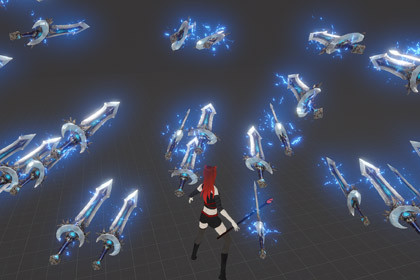
Use with any orbs! Spawn, switch, and launch magical character-following orbs with auras and hit effectsCharacter following orbs system is a flexible Unity system for creating magical orbs that follow your character, switch between different orb types, activate matching aura effects, and launch one orb at a time toward the target point from the center of the screen.The system is designed for magic skills, elemental abilities, companion orbs, RPG attacks, character buffs, spell systems, and third-person or first-person VFX setups.Orbs are spawned behind the character with randomized side, height, and back offsets, creating a natural floating formation instead of a perfectly even line. When the character moves, the orbs smoothly follow their assigned positions. Each left mouse click launches one orb toward the aim target, and when all orbs are used, the next click creates a new group.17 VFX prefabs inside.You can switch between different orb types using Q and E (customizable). Each orb type can have its own prefab, aura Particle System, hit Particle System, movement settings, rotation behavior, and impact behavior. Only one orb type can be active on the character at the same time.The system includes object pooling, so inactive orbs are reused when possible, and new ones are created only if the pool does not have enough available objects. Hit effects are placed inside each orb prefab and played on impact instead of being instantiated separately.Main features:Character-following magical orbsMultiple orb typesOrb switching with Q and E (customizable)One active orb type at a timeOne orb launched per clickFirst-last launch order for balanced visualsMatching aura Particle SystemsInternal hit Particle SystemsTrigger-based hit detectionPlayer collider ignoring without layersObject poolingOptional pool prewarmingOptional DontDestroyOnLoad pool supportSmooth follow movementIdle floating motionSurface normal or impact angle hit rotationFly animations are not included!Scripts included:HS_OrbCasterHS_OrbAroundCharacterMain setup:Add HS_OrbCaster to the character or controller object.Create an OrbCenter child object on the character.Assign Aim Camera, Orb Center, Orb Prefabs, and optional Orb Auras.Add HS_OrbAroundCharacter to each orb prefab.Each orb prefab should include a Rigidbody, Trigger Collider, main orb Particle System, and internal hit Particle System.Controls:Left Mouse Button: spawn or launch orbsQ: next orb typeE: previous orb typeRequired components on each orb prefab:RigidbodyCollider, usually Sphere ColliderHS_OrbAroundCharacterMain orb Particle SystemInternal hit Particle SystemRecommended Rigidbody settings:Use Gravity: OffIs Kinematic: OnInterpolate: InterpolateCollision Detection: Continuous SpeculativeRecommended Collider settings:Is Trigger: OnObject pooling:Reuses inactive orb objects when availableCreates new objects only when the pool does not have enough available orbsOptional prewarm count per orb typeOptional DontDestroyOnLoad pool objectRecommended pool object placement: root scene object, not child of the characterHit effect logic:Hit effect is a ParticleSystem inside the orb prefabOn hit, the main orb Particle System stopsThe internal hit Particle System moves to the hit point and playsThe orb object is disabled or returned to the pool after hit Particle System durationCollision logic:Uses Trigger collisionUses raycast checking during flight for more reliable fast projectile hitsIgnores character colliders without requiring layersIgnores other active orbsCompatibility:Unity 6+Uses Rigidbody.linearVelocityWorks with standard Unity Particle SystemSuitable for URP, HDRP, and Built-in Render Pipeline depending on the materials/shaders used in your effectsPerformance notes:Designed to avoid repeated Instantiate/Destroy during gameplay through object poolingHit effects are played from internal Particle Systems instead of spawning separate prefabsMain performance cost depends mostly on particle count, transparent overdraw, shaders, bloom, and texture resolution

