






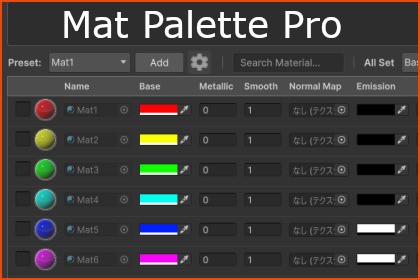
MatPalette streamlines Unity material management. Lists materials on screen for instant core property access. Reduces Inspector clicking. Presets & Batch Edit features smooth the Look-Dev workflow.The centralized access provided by MatPalette offers three key value-adds:1. Cognitive Load ReductionEliminates the tedious need to click through the Inspector hundreds of times to review dozens of materials. By consolidating all access into one dedicated screen, MatPalette allows you to allocate your cognitive resources (brain memory) to creativity, not tedious administrative work.2. Instant ComparisonsInstantly lists side-by-side setting values of adjacent materials. This makes it possible to detect subtle color mismatches or configuration errors in a blink. It's a powerful debugging effect achieved through enhanced visibility and information visualization.3. Non-destructive ExperimentationRapid property access means faster trial-and-error cycles. You can try a change and immediately revert if it doesn't work. The higher volume of rapid experimentation smooths your look-dev workflow and leads to a higher quality final product.Important Information & Notes:・To ensure stability, MatPalette only supports standalone .mat files located in the Assets/ folder. Materials embedded within FBX/Model files or those located in the Packages/ folder are not supported.・Optimized for shaders using standard property names . Custom shaders with non-standard property names may not display data in all columns.・Developed with Unity 6 (6000.3.11f1) or higher.--------------------------------------------------------------------------------Third-Party Software Notices--------------------------------------------------------------------------------Asset uses 3D Models (Monster01.fbx - Monster05.fbx) under CC0; see Third-Party Notices.txt file in package for details.Supported Unity Versions:Developed and Tested on Unity 6 (6000.3.11f1)Compatible with Unity 6 (6000.3.x) and laterSupported Render Pipelines:Universal Render Pipeline (URP)Optimized for URP Standard Shaders (Lit, etc.)Included Assets:C# Scripts × 2 (Main Window Logic & Session Data Structure)UI Toolkit Files × 2 (UXML for Layout & USS for Styling)Documentation × 1 (Readme / Setup Guide)Used for:Code generation, debugging, and drafting the store description.Tools used: Google Gemini, AntigravityAI assisted in the development process for code refinement, debugging, and structuring documentation. All logic was reviewed, tested, and modified by the creator in Unity. AI was also used to draft the English description for the store page. No AI-generated images or audio are included in this package.

