






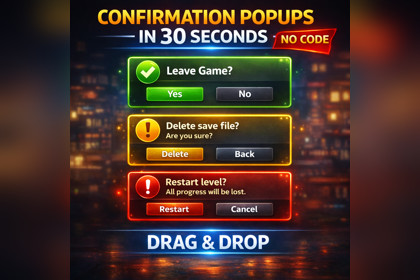
Polished drag-and-drop confirmation popup system for Unity 6 with yes/no dialogs, OK popups, keyboard support, style presets, icons, sounds, and a simple API.ONeil Tech Confirmation Popup System is a beginner-friendly confirmation and modal popup package for Unity 6 that helps developers add polished yes/no dialogs and single-button popups to their projects in minutes. Import the package, drag the included prefab into your scene, press Play, and trigger a popup with a simple API call like ShowConfirmation("Quit Game?").The package is designed for fast setup, clean presentation, and easy customization. It includes a polished modal overlay, title and body text support, confirm and cancel buttons, optional close button support, keyboard-friendly Enter and Escape handling, optional background click close, style presets, optional icons, optional sounds, and a demo scene with documentation. Buyers can use it immediately with the default prefab or customize the visual style through the inspector without needing to build their own popup system from scratch.Built for Unity 6Uses Unity UI / UGUIUses TextMeshProNo third-party dependenciesURP compatibleDrag-and-drop prefab workflowMain prefab included: ONeilConfirmationPopupSystem.prefabDemo scene included: ConfirmationPopupDemo.unityRuntime API includes:ConfirmationPopupManager.ShowConfirmation(string message)ConfirmationPopupManager.ShowConfirmation(string title, string message)ConfirmationPopupManager.ShowConfirmation(string title, string message, Action onConfirm)ConfirmationPopupManager.ShowConfirmation(string title, string message, Action onConfirm, Action onCancel)ConfirmationPopupManager.ShowYesNo(string message, Action onYes, Action onNo)ConfirmationPopupManager.ShowOk(string message)ConfirmationPopupManager.ShowConfirmation(ConfirmationPopupRequest request)ConfirmationPopupManager.HidePopup()Included features:Yes / No confirmation popupsSingle-button OK popup modeTitle + body supportOptional close buttonOptional background click closeEnter key confirm supportEscape key cancel supportStyle presetsOptional icon supportOptional sound supportInspector-based customizationSetup validation warningsIncluded preset styles:DefaultDestructiveSuccessInfoIncluded documentation:OverviewQuick StartDrag-and-Drop SetupAPI ExamplesButton Label CustomizationStyle CustomizationIcons And SoundsInspector GuideTroubleshootingCustomization TipsOptimizations and Debugging

