






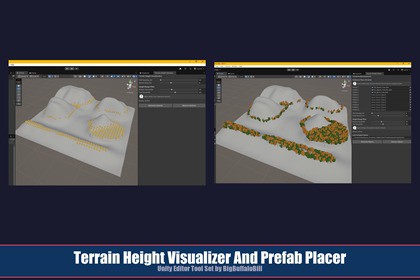
Two terrain tools: Terrain Height Spheres uses sphere objects to show height bands; Terrain Prefab Placer places permanent game objects on terrain building on the same height-band logic.Terrain Height Visualizer & Prefab PlacerA paired set of editor tools for reading and populating terrain elevation -- analyze your landscape, then bring it to life. By BigBuffaloBill.WHAT'S INCLUDEDThis package contains two self-contained editor tools designed to work together.Terrain Height Spheres -- drops a grid of color-coded spheres (yellow = low, red = high) across your terrain so you can read elevation at a glance in the Scene view. Non-destructive; spheres are never saved to the scene file. Requires URP.Terrain Prefab Placer -- scatters prefabs across the terrain surface, filtered by elevation and randomized in position, rotation, and scale. Objects are saved to the scene. Works with any render pipeline.Full documentation for each tool is in its own subdirectory: TerrainHeightSpheres/ and TerrainPrefabPlacer/ -- each contains an HTML doc, README, and ImportantNoteAboutSupport.Docs:Terrain Height Visualizer & Prefab Placer PackageTerrain Height SpheresTerrain Prefab PlacerAuthor's Note on Expected FunctionalityWHY THEY'RE PACKAGED TOGETHERBoth tools share the same percentile-based height filter and grid-spacing model. Once you understand how the filter works in one tool, you know how it works in both.The intended workflow is: (1) Use Terrain Height Spheres to visualize your terrain's elevation bands and identify the percentile range for the area you want to populate. (2) Carry those exact percentile values into Terrain Prefab Placer to place prefabs in that same elevation zone. Repeat across multiple elevation bands, baking each pass to build up a layered, natural-looking scene.NOTE -- Terrain Height Spheres (view only): The spheres are a read-only analysis overlay. They are never written to the scene file and will disappear if you enter Play Mode or close the scene. This is by design -- the tool is purely for reading your terrain, not for placing anything in it.NOTE -- Terrain Prefab Placer (objects land in the scene immediately): Generated prefabs are standard scene GameObjects from the moment you click Generate. They can be removed using the Remove Objects button or deleted from the Hierarchy. Once you click Bake Current Objects, the tool releases its reference to that container -- the objects remain in the scene permanently but the tool no longer tracks them. The same applies if you leave the scene and return: the container reference is lost and cleanup must be done manually from the Hierarchy. Save your scene after generating or baking to preserve your work. See the TerrainPrefabPlacer/ documentation for full details on object lifecycle, baking, and container management.SHARED CONCEPTSPercentile Height Filter: Both tools have a Bottom Percentile and Top Percentile slider (0-100) that define a slice of your terrain's elevation range. The global height range is computed fresh across all terrains in the scene on each generation pass. A given percentile pair resolves to the same absolute height band in both tools.Examples:0-100 = full terrain, no filter.0-30 = valleys and low ground only.40-60 = mid-elevation band only.70-100 = upper slopes and ridgelines.Grid Spacing: Both tools use a Grid Spacing slider (meters) to control how densely points are sampled or placed. Start at 100m or higher and reduce as needed. Very small values create a large number of objects and can slow the Editor.SUPPORT AND CONTACTPublisher: BigBuffaloBill. Discord: BigBuffaloBill & Friends Gaming: https://discord.gg/HadwVTP3r5Terrain Height Visualizer & Prefab Placer is a product of BigBuffaloBill. REQUIREMENTSTerrain Height Spheres: 2020.3 LTS or later, URP required, no dependencies, Editor-only.Terrain Prefab Placer: 2020.3 LTS or later, any render pipeline (URP, HDRP, Built-in), no dependencies, Editor-only.INSTALLATIONPurchase on the asset store and click Open.In the Package Manager, click Download, then Import.Accept the Import dialog and allow to compile.Both tools are available immediately under Tools > BBB in the menu bar. No additional setup required.To import only one tool, uncheck the other tool's subfolder in the Import Package dialog. They have no shared code or dependencies.PROJECT STRUCTURE AFTER IMPORTAssets/BBB/TerrainHeightVisualizerAndPrefabPlacer/├── TerrainHeightSpheres/│ ├── Editor/│ │ └── TerrainHeightSpheres.cs│ ├── TerrainHeightSpheres.html│ ├── README.md│ └── ImportantNoteAboutSupport.html└── TerrainPrefabPlacer/├── Editor/│ └── TerrainPrefabPlacer.cs├── TerrainPrefabPlacer.html├── README.md└── ImportantNoteAboutSupport.html```AI used as a reference like google for coding API details and minor bits of boilerplate. All design and creative via my experience as a career software engineer.

