






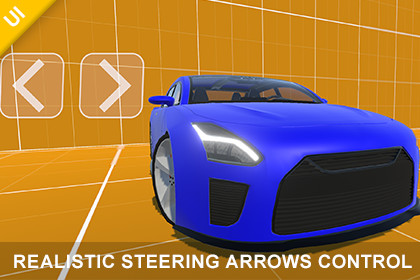
Realistic Steering Arrows Control – Mobile Steer Input
Transylvanian Tales
$5.49
(no ratings)
Jump AssetStore
Responsive steering arrow controls for mobile and PC. Easily add smooth directional input to cars, boats, planes, or any game requiring precise steering.1. Navigate to:/Assets/TransylvanianTales/SteeringArrowsControl/2. Import the correct package:- URP.unitypackage or HDRP.unitypackage(BRP requires no import)3. After importing, open:/CarDemo/RenderPipelines/[Your RP]/4. Open the Demo scene and press PlayPlay a WebGL demo here:https://transylvanian-tales.itch.io/steering-arrows-control-demo🎮 Realistic Steering Arrows Control – Mobile Steer InputSteering Arrows Control is a flexible and lightweight input system that converts simple left/right button presses into smooth, continuous steering values.Designed for mobile and cross-platform projects, it provides responsive and natural directional control using a hybrid system of hold-based steering and tap-based input.Built as a ready-to-use solution, it includes everything you need—from core logic to demo scenes—so you can integrate it into your project in minutes.🚀 Key FeaturesSmooth Steering SystemContinuous input from -1 to 1Gradual acceleration and decelerationNatural return to center when releasedHybrid Input (Hold + Tap)Hold for smooth sustained steeringTap for quick directional impulsesPrecise and responsive controlEvent-Driven ArchitectureClean input handling via eventsEasy integration with any gameplay systemDecoupled and modular designLightweight & EfficientNo unnecessary allocationsMinimal performance overheadSuitable for real-time gameplay📱 Multi-Platform SupportMobile (Android / iOS – touch input)PC (mouse input supported)Works with Unity UI and Event Triggers🎨 Customizable UIUse included arrow and background spritesReplace visuals with your own assetsFully adaptable to any game style📦 What’s IncludedSteering Arrows Control componentPre-configured UI prefab (left/right buttons)Arrow sprites and button backgroundsDemo scene (basic setup)Car demo (vehicle controlled using steering input)Full documentation and setup guidesVideo tutorials🧠 Designed for FlexibilityThe system is completely independent of gameplay logic.Use it to control:CarsBoatsTanksPlanesCharactersOr any system requiring directional inputSimply subscribe to input events or read the steering value directly.🚗 Car Demo IncludedA complete vehicle demo is included to showcase real-world usage.Drive a car using steering arrowsSee how input translates into gameplayBuilt using a modular vehicle controller system🧩 Modular ArchitectureOrganized into reusable and maintainable systems:Core logic located in _Common (shared systems)Asset-specific content separated for easy useDesigned for scalability across multiple assets🎨 Render Pipeline SupportBuilt-In Render Pipeline (BRP) – ready to useUniversal Render Pipeline (URP) – supported via included packageHigh Definition Render Pipeline (HDRP) – supported via included package⚙️ Easy SetupDrag & drop the prefab into your sceneOr create your own UI buttonsHook up button events (press/release)Start receiving steering input instantly📚 Documentation & LearningClean and structured documentationArchitecture and system breakdownStep-by-step setup instructionsVideo tutorials includedIn this YouTube playlist you will find tutorials:https://www.youtube.com/playlist?list=PL2ESxGsWSBc4yOagAd5fEoaxJBVIQOjM3🔒 No External DependenciesNo external APIs usedNo third-party services requiredNo API keys neededFully self-contained within the package💡 Perfect ForMobile gamesDriving and racing gamesArcade-style controlsSimulation systemsAny game requiring directional inputCore Features:Smooth steering input (-1 to 1 range)Hold input for continuous steeringTap input for quick directional impulsesAutomatic return to center when releasedEvent-driven architecture (OnInputChanged)Frame-rate independent behaviorLightweight with no runtime allocationsInput System:Supports touch (mobile) and mouse (PC)Works with Unity UI buttons and Event TriggersMulti-touch compatibleIncluded Content:Steering Arrows Control componentReady-to-use UI prefab (left/right arrow buttons)Arrow sprites and button background visualsDemo scene (basic setup)Car demo scene (vehicle controlled using steering input)Full documentation and setup guidesVideo tutorialsArchitecture:Modular package-based structure/Assets/TransylvanianTales/_Common/Core logic located in:/Assets/TransylvanianTales/SteeringArrowsControl/Asset-specific content located in:Render Pipeline Support:Built-in Render Pipeline (BRP) – ready to useUniversal Render Pipeline (URP) – supported via included .unitypackageHigh Definition Render Pipeline (HDRP) – supported via included .unitypackageDependencies:Included internal packages (no external downloads required)Unity Requirements (for demos):TextMeshProInput SystemCompatibility:Works on mobile and desktop platformsCompatible with any gameplay system requiring directional inputExtensibility:Easily adaptable for:Vehicles (cars, boats, tanks, planes)Character movementLane-based systemsUI navigationCan be extended with custom input curves, limits, or feedback systemsExternal Dependencies / API Disclaimer:This asset does not use any external APIs or third-party servicesNo external code dependencies are requiredNo API keys are neededAll functionality is fully self-contained within the packageAI tools (such as ChatGPT and Google Gemini) were used to assist in generating documentation, licensing text, and written content. All code and functionality were developed and verified by the publisher.

