






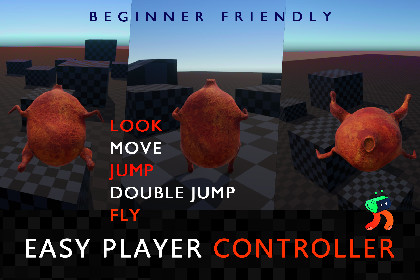
Easy Player Controller (Movement, Jump, Double Jump & Fly)
SR Studios Kerala
$7.70
(no ratings)
Jump AssetStore
A simple and easy-to-use player controller for Unity.
Includes basic movement, jump, double jump, and fly features.--------------------------------------------------Easy Player Controller (Movement, Jump, Double Jump & Fly)--------------------------------------------------A simple and easy-to-use player controller for Unity.Includes basic movement, jump, double jump, and fly features.Perfect for beginners, prototypes, and small projects.Comes with a ready demo scene for quick setup.------------------------Technical Details------------------------- Works with Unity 2021 and above- Uses Rigidbody physics- Uses Unity Built-in (Old) Input System (no extra setup needed)- No external packages required- Tested in a demo scene included in the package- Setup guide included------------------------Scripts Included------------------------- GroundCheck Checks if the player is touching the ground.- SimpleMovement Handles player movement like walking and sprinting.- SimpleJump Controls jumping, double jump, and flying.- PlayerLook Lets the player look around using the mouse.- PlayerAnimation Controls animations based on player actions.------------------------Features------------------------- Basic movement (Idle, Walk, Sprint)- Jump and Double Jump- Fly mode (toggle on/off)- Simple ground detection- Mouse look (camera control)- Animation support (ready to connect)- Easy to understand and modify------------------------How to use?------------------------> Import the package> Drag the Player prefab into your scene, and place your character model inside “Place Model Here.”> Adjust speed, jump, or fly settings in the Inspector if needed.> Remove extra cameras, keep ground on Default layer, then press Play.Controls: WASD move, Space jump, Shift sprint, F fly, Mouse look.========================NOTES / FAQ========================Q1: Can I use my own character model?A: Yes, you can easily use your own character. Just place it inside the "Place Model Here" object in the Player prefab.Q2: Do I need an Animator for this to work?A: Movement and gameplay will work without it, but an Animator is required if you want to use animations.Q3: Why is my player not jumping?A: Make sure the GroundCheck object is placed correctly at the player’s feet and is detecting the ground.Q4: Why does my player keep falling?A: Ensure your ground objects are on a detectable layer (Default layer is supported).Q5: Can I adjust movement and jump values?A: Yes, you can change speed, jump force, and other values directly in the Inspector.Q6: Does this work on mobile devices?A: This controller uses keyboard and mouse input by default. You can adapt it for mobile by replacing input controls with touch-based input.Q7: Is this suitable for beginners?A: Yes, the scripts are designed to be simple and easy to understand, making them beginner-friendly.Q8: Can I modify the scripts?A: Yes, the code is clean and open for modification to fit your project needs.Contact / Support:srstudioskerala@gmail.com- Works with Unity 2021 and above- Uses Rigidbody physics- Uses Unity Built-in (Old) Input System (no extra setup needed)- No external packages required- Basic movement (Idle, Walk, Sprint)- Jump and Double Jump- Fly mode (toggle on/off)- Simple ground detection- Mouse look (camera control)- Animation support (ready to connect)- Easy to understand and modify

