






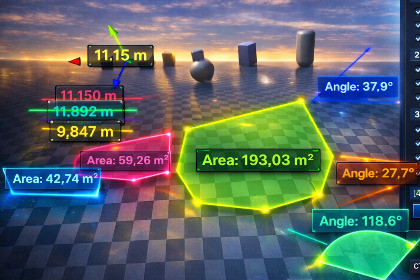
A feature-packed, intuitive measuring tool for the Unity Editor. Instantly measure distances, areas, angles, bounding boxes, and even bake measured 2D areas directly into 3D meshes!As an Editor utility, EasyMeasure is fully compatible out of the box with all Render Pipelines (Built-in, URP, and HDRP) and requires no additional setup.EasyMeasure is a lightweight, high-performance editor utility designed to supercharge your level design, environment art, and scene arrangement workflow.Stop guessing distances and sizes! EasyMeasure goes far beyond simple A-to-B lines. It offers a complete suite of interactive tools to measure paths, calculate areas, check angles, and analyze object bounds directly within the Scene View. Whether you are greyboxing a new map, checking physical dimensions, or placing props with precision, EasyMeasure provides the exact data you need without cluttering your hierarchy.Designed for Professionals:EasyMeasure is built to be non-intrusive. It lives purely in the editor, modifies absolutely nothing in your scene implicitly, and leaves zero overhead in your final game build.Core Features:Interactive Modes: Measure Lines, Paths, Areas (m²), and Angles (°).Area-to-Mesh Baking: Instantly convert any measured area into a 3D Greybox Mesh with a single click – perfect for rapid level prototyping!Smart Bounding Boxes: View exact X, Y, and Z dimensions of selected objects based on actual mesh bounds (supports children and Skinned Mesh Renderers).Chronological Multi-Selection: Select multiple objects to automatically draw distance chains between them in the exact order of selection.Precision Snapping: Hold 'V' while measuring to snap perfectly to mesh vertices.Terrain-Hugging Paths: Option to automatically drop path measurement lines directly onto the ground/terrain.Advanced Utilities: Laser Height-to-Ground tool and a 1.8m Human Scale Ghost reference for quick proportion checks.Smart UI: Labels automatically scale based on camera distance for perfect readability. Click any label to copy the value to your clipboard.Real-time Editing: Click on any saved measurement to drag its points or edges dynamically.Clean Workflow: Full hotkey support (Enter to save, Ctrl+Z to undo points, Backspace to delete, Esc to clear).AI was used to generate and recreate the user interface (UI) graphics, icons, and textures based on original interface concept layouts and reference images.

