






VFX Sprite Studio - Record, Remove BG, Generate Sprite Sheets & GIF
Eric VFX Studio
$21.99
(no ratings)
Jump AssetStore
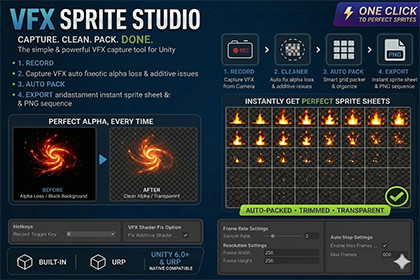
It is an high-efficiency toolkit for game developers and visual effects artists. It streamlines the entire pipeline of capturing dynamic effects and packing them into production-ready sprite sheets.✦ VFX Sprite Studio: Product OverviewVFX Sprite Studio is an all-in-one, high-efficiency toolkit built for Unity game developers and visual effects artists. It streamlines the entire pipeline of capturing dynamic in-game effects and packing them into production-ready sprite sheets.Key FeaturesVFX Camera Recorder (With Auto-Filtering)Captures frame sequences directly from a designated camera. It features smart, pixel-perfect scanning that automatically detects and strips out empty or completely transparent frames from the beginning and end of a sequence, ensuring no storage waste.Perfect Alpha Transparency FixSolves the classic industry headache of alpha channel loss caused by Additive or custom blending shaders. It accurately reconstructs alpha transparency based on RGB color brightness across Built-in, URP, and Unity 6 pipelines.Smart Grid Auto-PackerInstantly organizes and bakes the optimized frame sequence into a perfectly aligned sprite sheet grid with automated layout scaling, ready to be plugged into any particle system or UI framework.Cross-Pipeline & Unity 6 ReadyFully compatible with Unity’s classic Built-in Render Pipeline, Universal Render Pipeline (URP), and upgraded to seamlessly bypass input conflicts under Unity 6's modern environment.Workflow[1. REC Sequence] ──> [2. Auto-Filter Blanks] ──> [3. Fix Alpha] ──> [4. Auto-Pack Grid](One-Click Record) (Strips Empty Frames) (Perfect Transparency) (Smart Layout Bake)Capture: Press a single hotkey in Play Mode to start capturing your VFX.Filter: The system instantly drops blank frames and updates consecutive numbering.Pack: Open the Packer window to generate a clean, ready-to-use Sprite Sheet instantly.PS: It is recommended that you drag the effects file into the Demo Scene to record, or create a completely new scene. Do not use a scene that you have modified a lot of settings, as settings such as post-processing may cause the black background to be unable to be removed during recording.------------------------------------------------------------------------V1.01 Update## New Features### Glow Transparent PNG Capture* Added a new capture mode for glow-heavy VFX.* Captures the Game View result and converts black background VFX into transparent PNG frames.* Designed for additive effects, Bloom, HDR glow, magic effects, lightning, energy shields, fire, and similar VFX.* Helps preserve glow and soft edges better than standard alpha extraction for bright additive-style effects.* Best results require a pure black Game View background.### Game View ScreenShot* Added a new Game View Screenshot mode.* Captures the final Game View output directly.* Useful for preview images, showcase renders, and GIF previews.* Better preserves the visual result of Bloom, HDR colors, tonemapping, and post-processing.* This mode is intended for visual previews and does not output transparent PNG.### GIF Preview Export* Added automatic GIF preview export after recording.* The GIF is generated from the recorded PNG sequence.* Useful for quick previews, product pages, documentation, and sharing VFX results.* GIF files are saved together with the exported frame sequence for easy access inside the Unity Project window.* GIF export is designed as a preview format, while PNG sequence remains the recommended format for high-quality output.### Recording and Processing Status Display* Added a visible recording indicator in the Game View.* Shows recording status, captured frame count, GIF FPS, and elapsed time while recording.* Added a processing indicator after recording stops.* Users can now see when frames are being processed or when the GIF preview is being exported.* This helps avoid confusion during longer exports, especially when using Glow Transparent PNG processing.The copyright of this tool belongs to Eric VFX Studio and resale is prohibited.

