






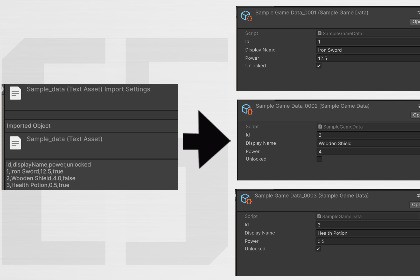
Turn CSV or JSON tables into ScriptableObject .asset files in the editor: drag a file, pick your type (optional Auto), choose a folder, Import—no runtime code required.t the ScriptableObject type (or use Auto to match column names), set where to save, and click Import. Each row or array entry becomes one asset.What you needA ScriptableObject script with fields that match your column/header names. Supported types: int, float, string, bool. CSV uses a header row; JSON uses a flat array of objects.NotesOutput folder defaults to your source file’s folder when it’s inside the project. Errors are shown in editor dialogs. See the package README for steps and examples.Support: easystudiowww@gmail.comCategory: Editor utility (no runtime scripts required for players).Unity: Use the minimum version you have tested (e.g. 2021.3 LTS or newer—confirm in your project).Dependencies: None (Unity Editor APIs only).Render pipeline: Not applicable.Platforms: Windows / macOS editor; asset output is under your project’s Assets or Packages paths as configured.Namespace: EasyTools.DataImporter (implementation detail; users only use the menu window).tech consultant

