






FlexiPlace - Object Placement System & Overlap Validation
bcyly Labs
$12.31
$17.59
30%OFF
(no ratings)
Jump AssetStore
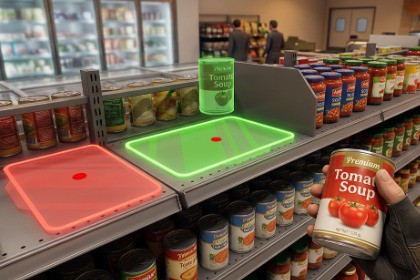
FlexiPlace a grid-free object placement system with real-time green/red preview, overlap-based validation, crosshair feedback, and plug-and-play setup.FlexiPlace is a modular object pickup and placement system for Unity. It uses raycast-based detection instead of a grid, giving players complete freedom to position objects anywhere in the world — exactly like placement mechanics seen in supermarket, cafe, and simulator-genre games.When a player picks up an object, a real-time ghost preview follows the cursor. The preview material switches between green (valid) and red (restricted) based on Physics.OverlapBox checks — no grid snapping, no tile constraints.The system is split into four focused scripts, each with a single responsibility, making it easy to extend or integrate into any existing project. Setup takes under ten minutes with the included step-by-step documentation.A demo scene is included featuring a first-person setup so you can test the system immediately after import. Please note: the 3D assets visible in the preview video are not included in the package — the demo scene uses basic placeholder geometry only.No grid required. Full freedom placement using raycasting. Real-time ghost/preview object with automatic material swapping. Green/red crosshair feedback driven by PlacementValidator. Physics.OverlapBox collision checks for accurate placement validation.Restricted layer and optional Allowed layer support for fine-grained control. Scene Gizmo: wire-cube visualisation of mesh bounds (green/red) in the Unity Editor. Cancel placement returns the object to its original position and rotation. Plug-and-play: assign a few Inspector fields and it works immediately. Full C# source code included — clean namespace, no third-party dependencies. Compatible with Legacy Input System. Unity 2021.3 LTS and above.Render pipeline: Built-in (URP/HDRP compatible with material swap)Namespace: ObjectPlacementSystemInput system: Legacy Input ManagerPhysics method: Physics.OverlapBox (no grid)Placement type: Raycast-based, grid-free, free placementThird-party dependencies: NoneSource code: Full C# source includedDemo scene: Included (basic setup, first-person). Preview video assets not includedDocumentation: Included (PDF)AI/ML was mainly used to assist in scripting and code structuring. It helped in improving code efficiency, fixing bugs and generating promos. All scripts were reviewed, tested, and finalized manually

