






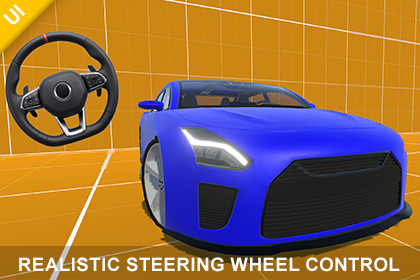
Realistic Steering Wheel Control – Mobile Touch Input
Transylvanian Tales
$5.49
$10.99
50%OFF
(no ratings)
Jump AssetStore
Realistic steering wheel UI control with smooth drag-based rotation, customizable settings, multiple visuals, and a full car demo. Ideal for mobile driving and simulation games.1. Navigate to:/Assets/TransylvanianTales/SteeringWheelControl/2. Import the correct package:- URP.unitypackage or HDRP.unitypackage(BRP requires no import)3. After importing, open:/CarDemo/RenderPipelines/[Your RP]/4. Open the Demo scene and press PlayPlay a WebGL demo:https://transylvanian-tales.itch.io/steering-wheel-control-demoRealistic Steering Wheel Control – Mobile & Touch InputSteering Wheel Control is a realistic, responsive, and highly customizable UI input system designed for mobile and touch-based applications.It simulates a real steering wheel by converting drag-based rotation into smooth, normalized input, making it ideal for driving games, simulations, and any system that requires rotational control.Key FeaturesRealistic drag-based steering inputSmooth and organic rotation behaviorNormalized output (-1 to 1)Adjustable sensitivity and maximum steering angleConfigurable dead zone with flexible behaviorOptional automatic centering (auto-reset)Event-driven input systemMultiple steering wheel visual styles includedLightweight and high-performance implementationSteering Wheel VariantsThe asset includes multiple ready-to-use steering wheel prefabs:Realistic steering wheelIcon-style steering wheelOutline-style steering wheelEach variant uses the same core logic, allowing you to:Quickly prototype different visual stylesSwap visuals without changing functionalityCustomize or replace sprites to fit your projectCar Demo IncludedA complete car demo is included to showcase real-world usage.It demonstrates how to connect the steering wheel input to a vehicle controller using a modular architecture.The demo supports multiple render pipelines:Built-In Render Pipeline (BRP)Universal Render Pipeline (URP)High Definition Render Pipeline (HDRP)This ensures compatibility across different project setups.Flexible Input SystemThe steering wheel outputs a normalized float value (-1 to 1), which can be used for:Vehicle steeringCharacter rotationCamera controlUI interactionsAny custom gameplay system requiring rotational inputYou can:Subscribe to events (OnInputChanged)Or poll input manually via APICustomizationThe system is designed to be highly configurable:Sensitivity → controls responsivenessMax Angle → defines rotation rangeDead Zone → stabilizes input near centerSubtract Dead Zone → smooths transitionsAuto Reset → returns wheel to neutralReset Speed → controls centering speedThis allows you to fine-tune the control for arcade, simulation, or hybrid experiences.Important – Pivot SetupCorrect pivot placement is essential for proper behavior.The steering wheel must rotate around its visual centerThis is controlled by the RectTransform pivotImportant notes:Included prefabs may use custom pivot values (not always 0.5, 0.5)This is intentional for non-perfectly round steering wheel visualsIf you replace the sprite (especially with a perfectly round image), you may need to adjust the pivotIncorrect pivot setup can result in:Off-center rotationUnnatural steering behaviorAlways verify pivot alignment when customizing visuals.PerformanceNo runtime allocationsMinimal computations per frameEfficient input processingSuitable for real-time applications on mobile and desktopThe system is designed to be lightweight and scalable.No External DependenciesNo external APIs are usedNo API keys are requiredFully offline and self-containedArchitectureThe asset follows a modular package-based structure:Core logic is separated into reusable packagesDesigned for integration into larger systemsEasy to extend and maintainUse CasesDriving gamesRacing gamesVehicle simulationsMobile control systemsAny rotational input-based gameplayIncluded ContentSteering Wheel Control systemMultiple steering wheel prefabsDemo scenes (visual showcase)Car demo (full integration example)Support for BRP, URP, and HDRPFull documentationDocumentation & TutorialsDocumentation is included within the asset.Video tutorials are available and will continue to be expanded over time:https://www.youtube.com/playlist?list=PL2ESxGsWSBc7Myz9AxvQ_3F38V1PXqB-hSupportIf you have any questions or need assistance:transylvanian.tales.gamedev@gmail.comUnity Version: 2022.3 or newer (recommended)Render Pipeline Compatibility:- Built-In Render Pipeline (BRP)- Universal Render Pipeline (URP)- High Definition Render Pipeline (HDRP)Platforms:- Mobile (iOS, Android)- PC (Windows, Mac)Input:- Mouse input (Editor / Standalone)- Touch input (Mobile devices)Features:- Drag-based rotational steering input- Normalized output (-1 to 1)- Adjustable sensitivity- Configurable maximum steering angle- Dead zone with optional subtraction behavior- Optional automatic reset with adjustable speed- Event-driven input system (UnityAction)- Gizmo visualization for dead zone (Editor only)Included Content:- SteeringWheelControl script- SteeringWheelControlGizmosDrawer (Editor tool)- Multiple steering wheel prefabs (realistic, icon, outline)- Demo scene (all variants)- Car demo scene (vehicle integration example)- Render pipeline-specific demo setups (BRP, URP, HDRP)Dependencies (Unity Packages for Car Demo):- TextMeshPro (com.unity.textmeshpro)- Input System (com.unity.inputsystem)Performance:- No runtime allocations- Lightweight and efficient- Suitable for real-time mobile applicationsImportant Notes:- Correct RectTransform pivot setup is required for proper rotation- No external APIs or API keys are used or requiredAI tools (such as ChatGPT and Google Gemini) were used to assist in generating documentation, licensing text, and written content. All code and functionality were developed and verified by the publisher.

