






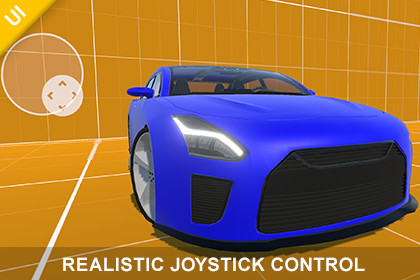
Realistic Joystick Control – Mobile Touch Input
Transylvanian Tales
$5.49
$10.99
50%OFF
(no ratings)
Jump AssetStore
Flexible and high-performance mobile joystick system with fixed, floating and dynamic modes, axis filtering, dead zone support, and fully customizable behavior.1. Navigate to:/Assets/TransylvanianTales/JoystickControl/2. Import the correct package:- URP.unitypackage or HDRP.unitypackage(BRP requires no import)3. After importing, open:/CarDemo/RenderPipelines/[Your RP]/4. Open the Demo scene and press PlayPlay a WebGL demo:https://transylvanian-tales.itch.io/joystick-control-demo🎮 Realistic Joystick Control – Mobile Joystick Touch InputJoystick Control is a flexible, high-performance UI joystick system designed for mobile and cross-platform projects. It delivers smooth, responsive analog input with full customization and multiple interaction styles.Built as a ready-to-use solution, it includes everything you need—from core input logic to polished demos—so you can integrate it into your project in minutes.🚀 Key FeaturesMultiple Joystick TypesFixedFloatingDynamic (adaptive movement)Highly CustomizableUse your own UI visualsAdjustable dead zone and handle rangeAxis filtering (Horizontal, Vertical, Both)Runtime behavior switchingAccurate & Responsive InputSmooth analog 2D inputStable dead zone handlingEvent-driven architecturePerformance FocusedLightweight and efficientNo unnecessary allocationsSuitable for real-time gameplayMulti-Platform SupportMobile (Android / iOS)PC (mouse input supported)Render Pipeline SupportBuilt-In Render Pipeline (BRP)Universal Render Pipeline (URP)High Definition Render Pipeline (HDRP)📦 What’s IncludedFully functional joystick systemPre-configured UI prefabsDemo scenes for each joystick typeCar demo (complete vehicle controller using joystick input)Modular package-based architectureFull documentation and tutorials🧠 Designed for FlexibilityJoystick Control is built to be independent of gameplay systems.Use it to control:CharactersCamerasVehiclesPhysics objectsOr any custom systemSimply subscribe to input events or read the input vector directly.🚗 Car Demo IncludedA complete car controller demo is included to demonstrate real-world usage.Drive a vehicle using the joystickSee how input translates into gameplayWorks across BRP, URP, and HDRP⚙️ Easy SetupDrag & drop prefab or create your own UIAssign background and handleConfigure settingsStart receiving input instantly📚 Documentation & LearningClean and structured documentationClear architecture breakdownStep-by-step usage guidanceVideo tutorials includedIn this YouTube playlist you will find tutorials:https://www.youtube.com/playlist?list=PL2ESxGsWSBc45QAbEy84VNm4zCsW9co5X🔒 No External DependenciesNo external API keys requiredNo third-party servicesFully self-contained💡 Perfect ForMobile gamesArcade and racing gamesTwin-stick shootersSimulation and controller-based systemsJoystick Control gives you a powerful, flexible foundation for handling input—so you can focus on building your game.⚙️ Technical DetailsUnity Version: 2022.3 or newer (recommended)Platforms Supported:AndroidiOSWindows / macOSInput System:Uses Unity UI Event System (IPointer interfaces)Compatible with both mouse and touch inputNo dependency on the new Input System packageArchitecture:Modular, package-based structureSeparation between core logic and demo/assetsReusable systems designed for integration across projectsCore Components:JoystickControl (runtime input logic)JoystickAxisOptions (axis filtering)JoystickType (behavior modes)JoystickControlGizmosDrawer (editor visualization)Features:Analog 2D input (Vector2)Fixed, Floating, and Dynamic joystick modesAxis filtering (Horizontal, Vertical, Both)Dead zone handlingAdjustable handle rangeEvent-driven input (UnityAction)Performance:Lightweight and optimizedNo runtime allocations during input updatesSuitable for real-time gameplayDependencies:Unity UI (uGUI)TextMeshPro (required for demo scenes only)Included Content:Prefabs (joystick setups)Demo scenes (all joystick types)Car demo (vehicle controller example)Documentation and tutorialsExtensibility:Easily extendable for:Input smoothingSensitivity curvesSnap directionsCustom behaviorsFile Structure:Assets: UI, prefabs, demo scenesInternal Packages: core systems and reusable modulesExternal Dependencies:NoneNo API keys requiredAI tools (such as ChatGPT and Google Gemini) were used to assist in generating documentation, licensing text, and written content. All code and functionality were developed and verified by the publisher.

