






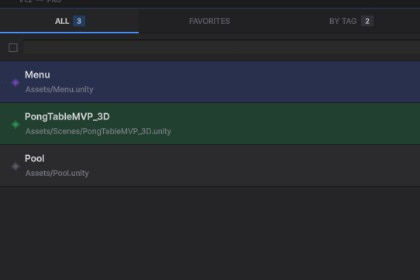
Smart scene manager for Unity. Organize, tag, bookmark and switch between scenes instantly. Save hours of workflow time every week.This asset is a pure Editor Tool and contains no shaders, materials, or render-pipeline-specific code. It is fully compatible with Built-in, URP, and HDRP pipelines without any modification. Requires Unity 2021.3 LTS or higher.Tired of hunting through your Project panel every time you need to switch scenes?Scene Flow Pro is a powerful editor panel that puts all your scenes at your fingertips. Organize with favorites, tags and notes. Switch scenes in one click. Never lose your camera position again.FEATURES:- Smart Scene Panel: See all your scenes in one organized list. One-click open or additive load. Inline search — filter by name or path instantly.- Favorites & Tags: Star any scene for quick access. Create custom tags and filter by them. Add private notes to each scene.- Pin to Top: Pin your most important scenes so they always appear at the top of the list.- Recent History: Automatically tracks the last 10 scenes you opened.- Camera Bookmarks: Save your exact SceneView camera position per scene. Restore it automatically when you return.- Build Settings Sync: See at a glance which scenes are in your build. Add or import scenes to Build Settings in one click.- Drag & Drop Reordering: Drag scenes to reorder your list manually.- Missing Scene Detection: Automatic validation removes scenes whose files no longer exist.- Built-in Quick Reference: Full documentation available inside the panel via the ? tab. No need to open external docs.- Unity 2021.3 LTS or newer (compatible with 2022, 2023 and Unity 6.x)- Works with Built-in, URP and HDRP render pipelines- No third-party dependencies- Pure Editor Tool — zero impact on game build size or performance- Data saved automatically via EditorPrefs- Fully dockable window — anchor next to Inspector, Hierarchy or any panel- 5 C# scripts, clean namespace (SceneFlowPro)- Keyboard shortcut: Ctrl+Shift+S / Cmd+Shift+SAI assistance (Claude by Anthropic) was used in this asset's development workflow in the following ways:— Code generation: All C# editor scripts were developed with AI assistance, including the main editor window, data persistence system, tag editor, camera bookmark system, and build sync panel.— Architecture design: The overall system structure, class relationships, and data flow were designed with AI collaboration.— Documentation: The in-panel quick reference guide and the PDF documentation were written with AI assistance.— Iteration & debugging: AI was used to identify and fix bugs during development and testing.All generated code was reviewed, tested, and validated in Unity 6.x by the publisher before submission.

